
This guide provides examples for operating EPSON RC+7.0 robot controllers remotely via Ethernet, covering IP settings, login commands, and remote…
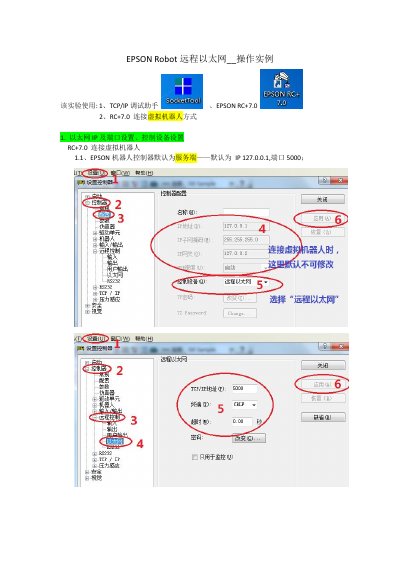
This document serves as an operation example for the EPSON RC+7.0 robot controller, demonstrating how to perform remote operations via Ethernet. It details the configuration of IP addresses and ports, as well as the setup of control devices to connect the controller to a virtual robot. This manual is written in Chinese.
The default IP is 127.0.0.1 and the default port is 5000.
You must use the Login command to log in before executing any other remote commands.
Send the command $Start,0 followed by a carriage return and line feed.