
Quick start guide for first-time setup of the Epocal epoc Host, covering charging, Wi-Fi, EDM connection, reset, and cradle removal.
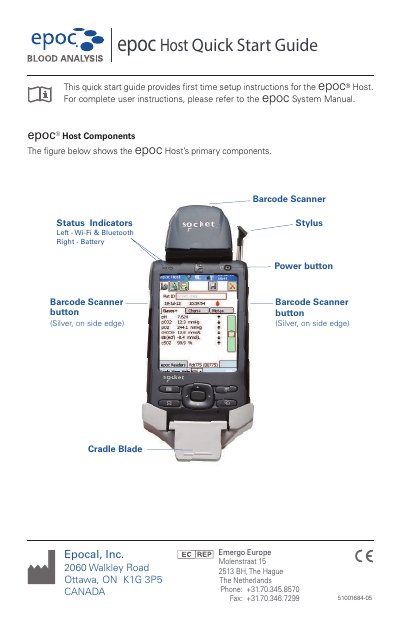
This quick start guide provides first-time setup instructions for the Epocal epoc Host. It covers charging the battery, connecting to a Wi-Fi network, connecting to an EDM, resetting the device, and removing the cradle.
For complete user instructions, refer to the epoc System Manual. The guide also identifies the Host's primary components and battery indicator states.
| Initial battery charge time | approximately eight hours |
|---|---|
| Battery indicator while charging | RED |
| Battery indicator when fully charged | GREEN |
The initial charge takes approximately eight hours.
A red battery indicator means the epoc Host is charging.
A green battery indicator means the epoc Host is fully charged.
Insert the stylus into the opening on the bottom of the Host Cradle for a soft reset; if that does not respond, press the top two buttons and the soft reset button together for a hard reset.