
User manual for DIGI-LOCK Mifare1 door access controller with installation, operation, and programming instructions.
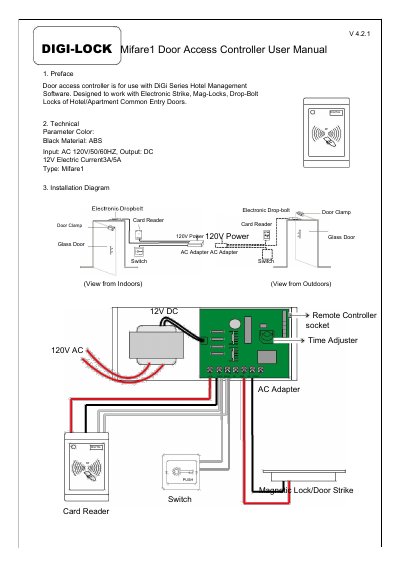
This manual covers installation, operation, and programming of the DIGI-LOCK Mifare1 door access controller. It includes diagrams for setup and step-by-step instructions for configuring access permissions using hotel cards or floor-specific cards. The device supports electronic locks and integrates with DiGi Series Hotel Management Software.
Key features include remote control (optional), automatic re-locking after 0–15 seconds, and the ability to clear room numbers or hotel IDs via reset or eraser cards.
| Color | Black |
|---|---|
| Material | ABS |
| Input Voltage | AC 120V/50 /60HZ |
| Output Voltage | DC 12V |
| Electric Current | 3A/5A |
| Type | Mifare1 |
Swipe the reset card to set it to allow only hotel cards.
The lock will automatically re-lock after 0 to 15 seconds.
Swiping the reset card clears room numbers but not hotel IDs; to clear hotel IDs, use the Eraser Card (ordered from supplier).