
Key facts
- Manuals
- 1
- Languages
- EN
- Last added
- 2026-11-02
Featured Digilock manuals
DIGI-LOCK Mifare1 Door Access Controller User Manual
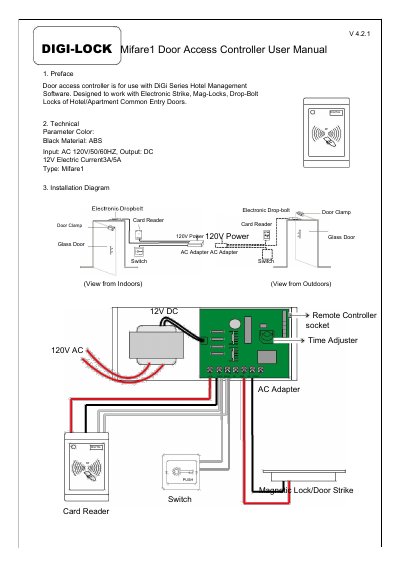
This manual covers installation, operation, and programming of the DIGI-LOCK Mifare1 door access controller. It includes diagrams for setup and step-by-step instructions for configuring access permissions using hotel cards or floor-specific cards. The device supports electronic locks and integrates with DiGi Series Hotel Management Software.
Key features include remote control (optional), automatic re-locking after 0–15 seconds, and the ability to clear room numbers or hotel IDs via reset or eraser cards.
Covers: Preface · Technical Parameter · Installation Diagram · Operation Instruction · Programming · Unlocking from outside
Latest Digilock manuals
DIGI-LOCK Mifare1 Door Access Controller User Manual
User Manual 2 pages · 416 KB · ENUser manual for DIGI-LOCK Mifare1 door access controller with installation, operation, and programming instructions.
Which document do I need?
User Manual
Day-to-day operation, settings and troubleshooting. Start here if the product is already set up.
Questions answered in Digilock manuals
How do I program the controller to allow only hotel cards to open the door?
Swipe the reset card to set it to allow only hotel cards.
What happens if the door doesn’t open within a set time?
The lock will automatically re-lock after 0 to 15 seconds.