
Installation and setup guide for the d.Safe 100 series wireless carbon monoxide alarm, covering mounting, Z‑Wave pairing, battery replacement and…
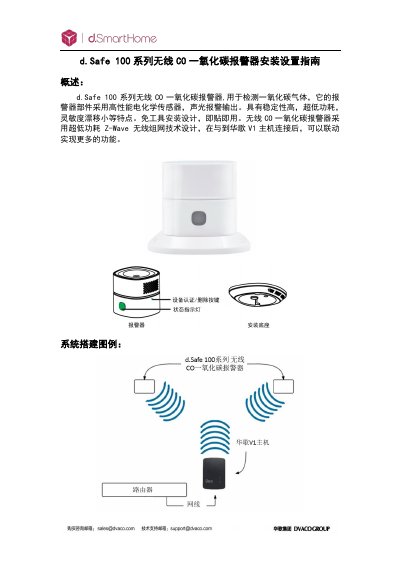
The d.Safe 100 series wireless CO alarm detects carbon monoxide using a high‑performance electrochemical sensor and provides audible and visual alerts. It operates on ultra‑low‑power Z‑Wave wireless networking and can be mounted on walls or placed on a tabletop.
This guide explains how to choose installation locations, mount the device, pair it with a V1 or ELAN hub, replace the battery, reset to factory defaults, and troubleshoot common issues such as low voltage or sensor contamination. This manual is written in Chinese.
| Working voltage | DC 3 V (CR123A lithium battery) |
|---|---|
| Battery life | 3 years |
| Standby current | ≤ 20 µA |
| Alarm current | ≤ 75 mA |
| Alarm sound pressure | 85 dB @ 1 m |
| Alarm concentration thresholds | 30 ppm (120 min), 50 ppm (60‑90 min), 100 ppm (10‑40 min), 300 ppm (≤ 3 min) |
| Communication technology | Z‑Wave |
| Z‑Wave indoor range | 30 m |
| Operating temperature | 0 °C ~ +40 °C |
| Dimensions (W×D×H) | 60 mm × 60 mm × 49.2 mm |
Installation in kitchens, garages, or other areas that may cause false alarms is not recommended.
Long‑press the certification/delete button, then power on the device; the ID code is cleared and all settings return to factory defaults.