
Key facts
- Manuals
- 2
- Languages
- ZH
- Last added
- 2026-09-30
Featured d.Safe manuals
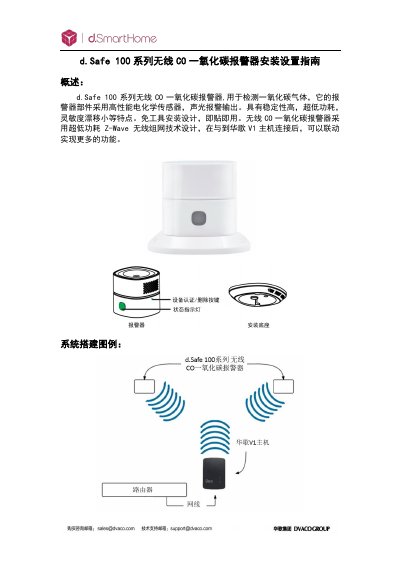
d.Safe 100 Series Wireless CO Alarm Installation Guide
The d.Safe 100 series wireless CO alarm detects carbon monoxide using a high‑performance electrochemical sensor and provides audible and visual alerts. It operates on ultra‑low‑power Z‑Wave wireless networking and can be mounted on walls or placed on a tabletop.
This guide explains how to choose installation locations, mount the device, pair it with a V1 or ELAN hub, replace the battery, reset to factory defaults, and troubleshoot common issues such as low voltage or sensor contamination. This manual is written in Chinese.
Covers: Overview · Technical specifications · Installation precautions · Installation steps · Z‑Wave pairing with V1 hub · Battery replacement
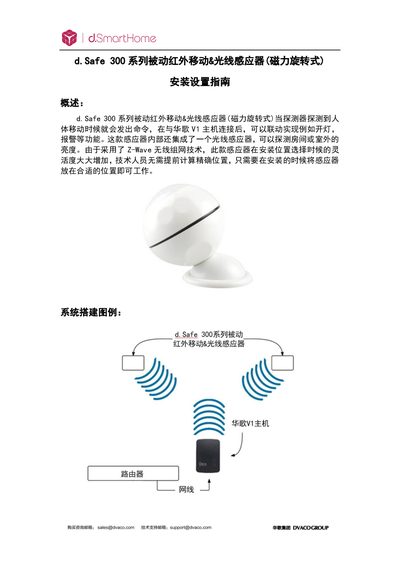
d.Safe 300 Series Passive Infrared Motion & Light Sensor Installation Guide
This guide explains how to install, configure, and maintain the d.Safe 300 series passive infrared motion & light sensor. It covers technical parameters, optimal mounting locations, and integration with the Huage V1 host and ELAN system.
Step‑by‑step instructions are provided for adding the sensor to the V1 host, deleting it, restoring factory settings, and creating automation scenes based on motion or light level triggers. This manual is written in Chinese.
Covers: Overview · Technical Parameters · Installation Procedure · Installation Position Selection · Adding to V1 Host · Deleting from V1 Host
Latest d.Safe manuals
d.Safe 100 Series Wireless CO Alarm Installation Guide
Installation Guide 13 pages · 1.6 MB · ZHInstallation and setup guide for the d.Safe 100 series wireless carbon monoxide alarm, covering mounting, Z‑Wave pairing, battery replacement and…
d.Safe 300 Series Passive Infrared Motion & Light Sensor Installation Guide
Installation Guide 16 pages · 1.6 MB · ZHInstallation guide for the d.Safe 300 series passive infrared motion and light sensor with Z‑Wave connectivity.
Which document do I need?
Installation Guide
Mounting, wiring and first power-up. Read it before the hardware goes in.
Questions answered in d.Safe manuals
Can the alarm be installed in the kitchen or garage?
Installation in kitchens, garages, or other areas that may cause false alarms is not recommended.
From: d.Safe 100 Series Wireless CO Alarm Installation Guide
How do I reset the alarm to factory settings?
Long‑press the certification/delete button, then power on the device; the ID code is cleared and all settings return to factory defaults.
From: d.Safe 100 Series Wireless CO Alarm Installation Guide
How do I add the sensor to the V1 host?
Enter the V1 host, select “Devices”, choose “Add Device”, pick “Generic Z‑wave device”, then follow the prompts to place the sensor within 3 m of the host and complete the 60‑second authentication.
From: d.Safe 300 Series Passive Infrared Motion & Light Sensor Installation Guide
How can I reset the sensor to factory settings?
Separate the sensor’s upper and lower parts, keep it powered, press and hold the certification/delete button for 10‑15 seconds, then release to restore factory defaults.
From: d.Safe 300 Series Passive Infrared Motion & Light Sensor Installation Guide