
User manual for the Cyclops Breeze OSD V1.0 flight display, covering connection, configuration, GPS usage, and return-to-home features.
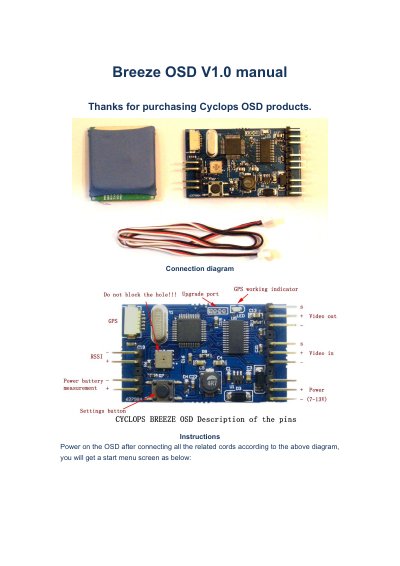
This manual provides instructions for connecting and operating the Cyclops Breeze OSD V1.0 flight display. It details the setup process, including connecting power and video inputs, and explains how to access the configuration menu to set parameters such as units (metric/imperial), RSSI values, and video format (PAL/NTSC/AUTO).
The document also covers flight data recording features, including maximum speed, distance, and height tracking. It explains the Return-to-Home (RTH) functionality, how to interpret the home icon, and provides troubleshooting tips for GPS acquisition and RSSI signal detection.
| Motor power voltage detection | 30V at most |
|---|---|
| RSSI port detection voltage | 0.1 - 6v |
| Video input formats | PAL, NTSC and AUTO |
| GPS lock time | 1 to 5 minutes |
Short press the setting button to reset the values, including height, distance, mileage, and elapsed time.
Perform a 3-second long press on the setting button to cycle through F-16 style, simple style, and no-display screen.
A flashing 'H' indicates that the home position is behind the plane.