
Key facts
- Manuals
- 5
- Models
- 2
- Categories
- 1
- Languages
- ZH
- Last added
- 2011-11-03
CycLOPS models by category
Featured CycLOPS manuals
Gigabyte GH-UDUE21-FC Graphics Card Cooler Installation Guide
This guide provides step‑by‑step instructions for installing the GH‑UDUE21‑FC cooler on supported NVIDIA and ATI graphics cards. It includes safety precautions, parts list, and wiring details to ensure a correct and reliable installation.
Key features include dual‑GPU support, high‑efficiency aluminum‑copper heat‑pipe design, a 2300 rpm radial‑flow fan with EBR bearing, and a lightweight 200 g construction. The specifications and supported platforms are listed, and a checklist of all accessories is provided. This manual is written in Chinese.
Covers: Installation Guide · Safety Precautions · Features Summary · Specifications · Accessories Checklist · Installation Instructions
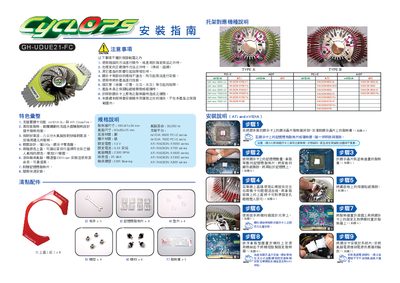
Gigabyte GH-UDUE21-FC Graphics Card Installation Guide
This guide outlines what is not covered by the warranty, such as misuse, over‑clocking, improper installation, modifications, and damage from disasters or removing the original heatsink. It also highlights key features like dual‑GPU support, efficient cooling, lightweight design, and customizable color caps.
The document provides detailed specifications, a full accessories list, supported platforms, and illustrated installation steps, including removal of the original cooler, applying thermal paste, mounting the new heatsink, and connecting the fan power cable. This manual is written in Chinese.
Covers: Warranty Exclusions · Features Summary · Specifications · Accessories List · Supported Platforms · Installation Instructions
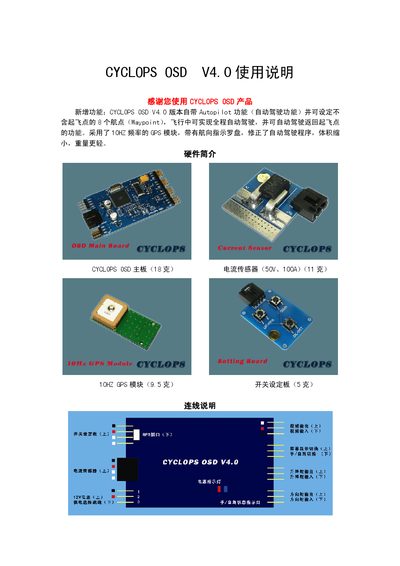
CYCLOPS 0SD V4.0 User Manual
The CYCLOPS 0SD V4.0 is a lightweight flight controller for model aircraft that includes a 10 Hz GPS module, autopilot capability, and multiple sensor inputs. The manual provides hardware overview, wiring instructions, and step‑by‑step guidance for powering on and navigating the display.
Key sections cover display parameters, autopilot settings, waypoint programming, and safety notes such as sensor zeroing and low‑battery alerts. Users can configure flight limits, altitude modes, and turn‑rate limits to match their aircraft performance. This manual is written in Chinese.
Covers: Hardware Overview · Wiring Instructions · Operation Instructions · Display Description · Precautions · Autopilot Section
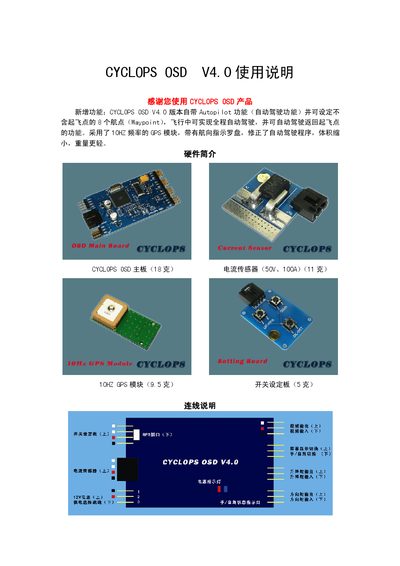
CYCLOPS OSD V4.0 User Manual
This guide introduces the CYCLOPS OSD V4.0 flight controller, its lightweight hardware (18 g main board, 10 Hz GPS module, current sensor, and switch board) and the new Autopilot function that can fly up to eight way‑points and return to the launch point automatically. It also explains the LED status indicators and the basic wiring connections.
The manual details how to power on the device, navigate the menu with the up/down keys, configure display options, reset the current sensor, and set autopilot parameters such as waypoint distance, heading correction limits, and cruise altitude. Safety notes, recommended model aircraft, and fail‑safe settings for loss of GPS signal are also covered. This manual is written in Chinese.
Covers: Hardware Overview · Wiring Instructions · Usage Instructions · Display Description · Precautions · Autopilot Section
Latest CycLOPS manuals
Gigabyte GH-UDUE21-FC Graphics Card Cooler Installation Guide
Installation Guide 1 pages · ZHInstallation guide for the Gigabyte GH-UDUE21-FC graphics card cooler, covering mounting steps, safety notes, specifications, and included accessories.
Gigabyte GH-UDUE21-FC Graphics Card Installation Guide
Installation Guide 1 pages · 1.5 MB · ZHInstallation guide for the Gigabyte GH-UDUE21-FC graphics card, covering warranty exclusions, features, specifications, accessories, and step‑by‑step…
CYCLOPS 0SD V4.0 User Manual
User Manual 8 pages · 525 KB · ZHThe CYCLOPS 0SD V4.0 user manual explains setup, flight display, autopilot functions, waypoint configuration, and safety precautions for the model aircraft…
CYCLOPS OSD V4.0 User Manual
User Manual 8 pages · 524 KB · ZHThe CYCLOPS OSD V4.0 user manual provides setup, operation, autopilot features, and parameter settings for the model aircraft controller.
CYCLOPS FPV Assistant V1.0 User Manual
User Manual 10 pages · 1006 KB · ZHThe CYCLOPS FPV Assistant V1.0 User Manual provides setup, configuration, and operation instructions for the FPV assistance device.
Which document do I need?
Installation Guide
Mounting, wiring and first power-up. Read it before the hardware goes in.
User Manual
Day-to-day operation, settings and troubleshooting. Start here if the product is already set up.
Questions answered in CycLOPS manuals
What accessories are included with the GH‑UDUE21‑FC package?
The package contains an upper cover (red), a bracket, an internal heatsink, washers, nuts, spacers, thermal paste, and a screwdriver.
From: Gigabyte GH-UDUE21-FC Graphics Card Cooler Installation Guide
What is not covered by the warranty?
The warranty excludes misuse, operation outside the correct method (e.g., over‑clocking), damage caused by other products, improper installation, modifications, disasters such as earthquakes or fire, a torn warranty sticker, damage when removing the original heatsink, and any loss from not following the installation order.
From: Gigabyte GH-UDUE21-FC Graphics Card Installation Guide
What accessories are included with the GH‑UDUE21‑FC card?
The package contains a colored cover (red) ×11, a screwdriver ×1, memory heat‑sinks ×8, spacers ×4, nuts ×4, standoffs ×4, and thermal paste ×1.
From: Gigabyte GH-UDUE21-FC Graphics Card Installation Guide
How do I reset the current sensor?
Press the Reset key to perform a one‑time zero calibration of the current sensor after factory setup.
How can I enable the autopilot function?
Enter the menu with the up/down keys, set the AUTO WAYPOINT option to Y, and the controller will display AUTOPILOT and operate automatically.
What does the manual say to do when no SD card is detected?
The device will display “NO SD CARD FOUND” and after about 5 seconds it returns to the main interface, waiting for a mini‑SD card to be inserted.