
Brother MFC-T4500DW Quick Setup Guide

English quick setup guide for the Brother MFC-T4500DW all-in-one printer, covering initial setup, ink filling, and network connection.
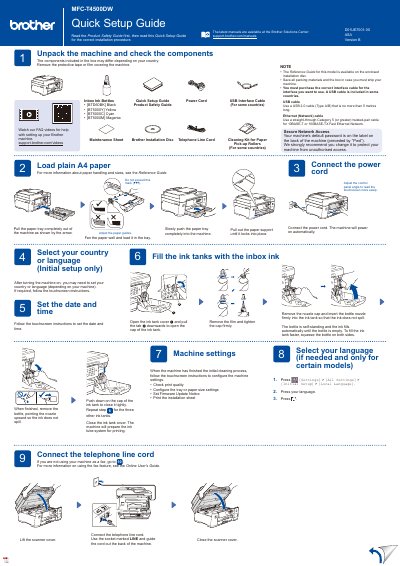

Brother MFC-T4500DW Quick Setup Guide - cover page
Brand
Brother
Category
Printer
Document type
Quick Start Guide
Language
English
Pages
2
File format
PDF
File size
1.3 MB
Published
19 November, 2026
Updated
19 November, 2026
MD5 checksum
2A7A6670F63C7A9AD49BA9C9FDE8E825

About this manual

This document serves as a Quick Setup Guide for the Brother MFC-T4500DW multifunction machine. It provides step-by-step instructions for unpacking the device, filling the inbox ink bottles, and connecting the power cord to turn the machine on. Users are advised to read the Product Safety Guide first and may need to select their country or language during the initial setup via the touchscreen.

What's inside

  • Quick Setup Guide
  • Product Safety Guide
  • Inbox Ink Bottles
  • Connect the power cord
  • Machine settings
  • Fill the ink tanks
  • Connect the telephone line cord
  • Connect your computer
  • Alternative wireless setup
  • Print or scan using your mobile device

Frequently asked questions

Where is the machine's default password located?

It is on the label on the back of the machine, preceded by "Pwd".

What USB cable should be used to connect the machine to a computer?

Use a USB 2.0 cable (Type A/B) that is no more than 5 metres long.

What paper should be loaded in the paper tray?

Load plain A4 paper.

How is the date and time set on the machine?

Follow the touchscreen instructions to set the date and time.

Download PDF (1.3 MB)

More Brother Manuals


View all Brother manuals →