
Bionime GM260 blood glucose meter quick start guide: battery installation, meter setup, lancing device preparation and taking a blood glucose measurement.
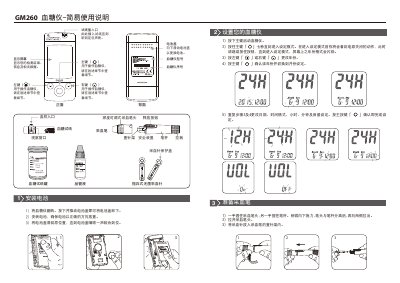
This is the two-page simplified instruction sheet ("简易使用说明") for the Bionime GM260 blood glucose meter. It identifies the meter parts — main, left and right buttons, display screen, test strip port, battery cover and serial number — together with the items used in a test: test strip vial, control solution, disposable sterile lancet and the lancing device with its adjustable-depth cap. Manufacturer details for Bionime (华广生技股份有限公司大庆厂, Taichung, Taiwan) and the meter and test strip registration numbers are printed at the end.
The guide walks through installing the battery, entering the setting mode by holding the main button for seven seconds and changing year, month, date, time format, hour, minute and volume with the left and right buttons, preparing the lancing device with a new lancet and choosing the puncture depth, and taking a measurement: insert the strip to switch the meter on, apply 1.0–3.0 µL of blood within two minutes, and read the result after five seconds. It closes with steps for removing and safely disposing of the used lancet and notes that detailed operating steps and result explanations are given in the full meter user manual. This manual is written in Chinese.
| Sample volume | 1.0–3.0 µL |
|---|---|
| Measurement time | 5 seconds |
| Blood application window | 2 minutes after the strip is inserted |
| Lancing device depth settings | Multiple selectable depths (soft/thin skin, normal skin, thicker skin) |
Turn the meter over, press and slide the battery cover off, insert the battery in the correct orientation, then slide the cover back until it clicks into place.
About 1.0 to 3.0 µL; less than 1.0 µL may give an inaccurate result, in which case the test should be repeated with a new strip.
After the blood is applied to the strip, a countdown is shown and the result appears 5 seconds later.
Press and hold the main button for seven seconds until the year format flashes on the display.