
Quick start guide for the Beckman Coulter CytoFLEX flow cytometer, covering startup, QC, data acquisition, settings, and shutdown.
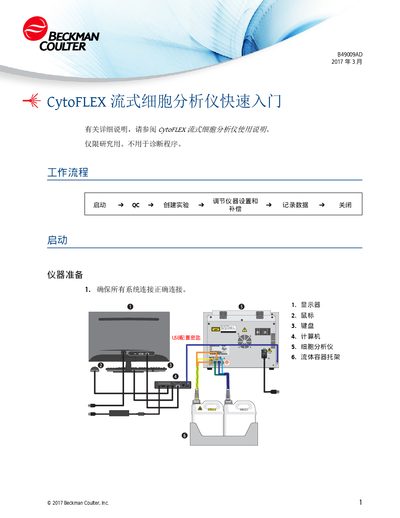
This guide provides step‑by‑step instructions for getting the CytoFLEX flow cytometer up and running. It covers connecting cables, powering the instrument, launching the CytExpert software, and preparing samples for analysis.
The document also explains how to perform instrument QC, adjust settings and compensation, record and export data, and carry out routine cleaning and maintenance to keep the system operating reliably. This manual is written in Chinese.
| Minimum QC flow rate | 100 events/second |
|---|
Open the power switch on the rear cover, log into the computer, launch CytExpert, and select the system startup program from the Cell Analyzer menu.
Select "Start QC" from the QC menu, load a tube with three drops of QC fluorescence beads and 1 mL DI water, then insert the tube into the sample rack and start QC.
Run FlowClean cleaning solution for 3 minutes, then run DI water for 5 minutes; perform deep cleaning of the flow cell monthly and replace pump tubing and sheath filter every six months.