
This guide explains user interface messages in BD FACSuite Clinical software, detailing possible causes and recommended solutions for Fail and Warning…
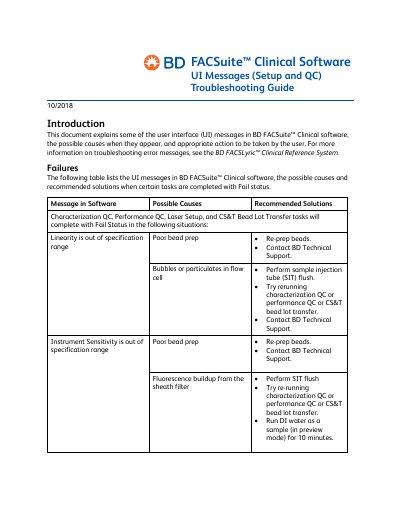
This document serves as a troubleshooting guide for the BD FACSuite Clinical software, specifically addressing user interface (UI) messages that appear during setup and quality control (QC) tasks. It covers scenarios where tasks such as Characterization QC, Performance QC, Laser Setup, and CS&T Bead Lot Transfer result in a 'Fail' status, providing specific causes and corrective actions like re-preparing beads or flushing the sample injection tube.
Additionally, the guide addresses situations where tasks complete with a 'Warning' status. It details issues related to laser power and current, Levey Jennings (LJ) alarm boundaries, bead expiration, laser alignment checks, and PMT voltage changes. For each warning, the document outlines the likely cause, such as laser drift or expired reagents, and provides step-by-step instructions for resolution or when to contact technical support.
A Characterization QC task may fail due to linearity or instrument sensitivity being out of specification, poor bead prep, bubbles or particulates in the flow cell, or fluorescence buildup from the sheath filter.
If the %CV value has changed by more than 50% from the characterization QC report, you should run laser setup, re-prepare beads, and perform a SIT flush.
If a CS&T beads expiration warning appears, you must use a bead lot that has not expired.
A Missing SOV error occurs when an assay contains a fluorochrome that has not been added to the default reference settings.