
Quick guide for the AudioCodes RXVCAM10-CC content camera, covering kit contents, wall mounting, camera angle and rod adjustment, and specifications.
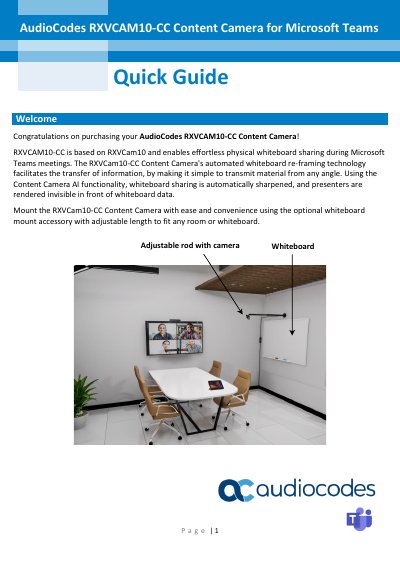
The AudioCodes RXVCAM10-CC content camera is based on RXVCam10 and supports physical whiteboard sharing during Microsoft Teams meetings. Its automated whiteboard re-framing technology transmits material from any angle, sharpens whiteboard content, and renders presenters invisible in front of whiteboard data.
The guide lists the camera kit contents and provides mounting steps using the adjustable rod and mounting base, followed by instructions for adjusting camera angle and rod length. It also includes recommended whiteboard sizes, mounting methods, and technical specifications for the camera, mount unit, USB connection box, and extension cable.
| Image Sensor | High-quality CMOS sensor |
|---|---|
| Effective Pixels | 2MP, 16:9 |
| Video Compression | MJPEG, YUV2, H.264, H.265 |
| USB | USB 2.0 (for power and firmware upgrade) |
| Angle of View | 92° (D) / 85° (H) / 52° (V) |
| Focal Length | f = 3.24 mm |
| Maximum Resolution | 1920 x 1080 |
| Maximum FPS | 30 fps |
| Minimum Illumination | 0.5 Lux (F1.8, AGC ON) |
| SNR | > 50 dB |
| Input Voltage | 5 V |
| Input Current | 500 mA (max) |
| Power | 2.5 W (max) |
| Operating Temperature | -10°C ~ +50°C |
| Storage Temperature | -10°C ~ +60°C |
| Operating Humidity | 20% ~ 80% |
| Storage Humidity | 20% ~ 95% |
| Camera Cable Length | 1.8 m |
| Camera Dimensions | 102 x 46 x 30 mm |
| Camera Weight | 0.15 kg |
| Compliance | FCC, CE, RCM, IC |
| Mount Unit Length | 700-1200 mm |
| Mount Unit Color | Matte black |
| Mount Unit Loading Weight | 5 kg |
| Mount Unit Part Weight | 0.57 kg |
| USB Connection Box Size | 105 x 50 x 20 mm (L x W x H) |
| USB Extension Cable Type | USB 2.0 |
| USB Extension Cable Length | 10 m |
The shipped box includes the RXVCAM10 mount unit with four mounting screws, a USB connection box with adhesive fastener, and a 10 m USB 2.0 extension cable.
Turn the twist-lock collar counterclockwise to unlock the telescopic rod, slide it to the desired length, and turn the collar clockwise to lock it. For the camera angle, unlock the collar, rotate the camera to the desired angle, and secure the position by turning the collar clockwise.
For a 4 x 4 whiteboard, use a 67 cm rod and mount it 3 cm above the center of the board.
Drill four holes using the mounting base as a template, insert wall anchors, screw the mounting rod onto the base, and attach the camera to the end of the rod. Then secure the base to the wall with four flathead M4 x 25 mm screws and route the USB cable through the cable conduit.