
AudioCodes 405HD GbE IP Phone Quick Start Guide

Quick setup guide for the AudioCodes 405HD GbE IP Phone compatible with Microsoft Skype for Business and Lync.
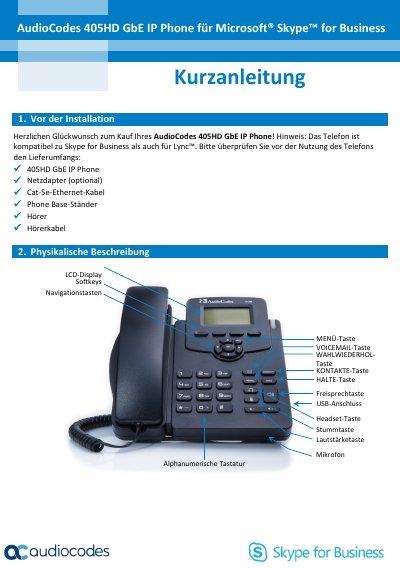

AudioCodes 405HD GbE IP Phone Quick Start Guide - cover page
Brand
AudioCodes
Document type
User Manual
Language
German
Pages
5
File format
PDF
File size
523 KB
Published
01 November, 2026
Updated
01 November, 2026
MD5 checksum
1BB9402A396C4C17D010AA40625D38D0

About this manual

This guide provides step-by-step instructions for installing, wiring, mounting, and configuring the AudioCodes 405HD GbE IP Phone. It covers connecting the phone to a network, setting up the headset or USB, mounting on desk or wall, and logging into Skype for Business using either username/password or phone number/PIN. It also explains how to make calls, transfer, redial, mute, hold, and set presence status. This manual is written in German.

What's inside

  • Installation
  • Wiring
  • Mounting
  • Logging In
  • Making Calls
  • Call Transfer
  • Redial
  • Mute
  • Hold
  • Presence Status

Frequently asked questions

Which communication platforms is the AudioCodes 405HD GbE IP Phone compatible with?

The phone is compatible with Microsoft Skype for Business and Lync.

What is the required voltage for the phone's power adapter?

You must connect the power adapter to the 5V socket on the phone.

How do you enter the at symbol when setting up the phone?

Press the number 1 key repeatedly until the @ symbol is displayed.

Download PDF (523 KB)

More AudioCodes Manuals


View all AudioCodes manuals →