
Allied Telesis TQ6602 GEN2 and TQm6602 GEN2 wireless access point quick installation guide covering mounting, cabling, power, and initial management login.
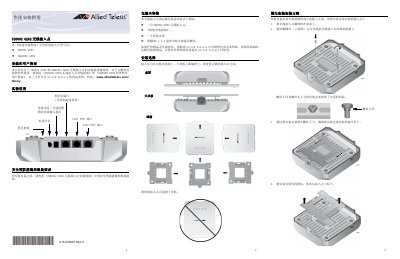
This quick installation guide covers the Allied Telesis TQ6602 GEN2 and TQm6602 GEN2 wireless access points. It describes package contents, mounting options, and where to find full installation and management instructions on the Allied Telesis website.
The guide explains how to mount the access point on a desk, ceiling, or wall, connect Ethernet and power cables, and start the initial management session using the default IP address 192.168.1.230 or a DHCP-assigned address. This manual is written in Chinese.
| Maximum power consumption | 25.5 W |
|---|---|
| Rated voltage | 直流 48安 |
| Rated current | 0.67安 |
| Adapter input voltage | 100-240 VAC |
| Default IP address | 192.168.1.230 |
| Default login credentials | Username manager, password friend |
The access point uses the default IP address 192.168.1.230.
Enter username “manager” and password “friend”; both are case-sensitive.
Yes. The adapter is the main power source and PoE+ is redundant when both are connected.