
This document is a Yeastar TDM800E analog interface card installation guide, which introduces how to install TDM800E card in the computer and how to connect FXS and FXO ports.
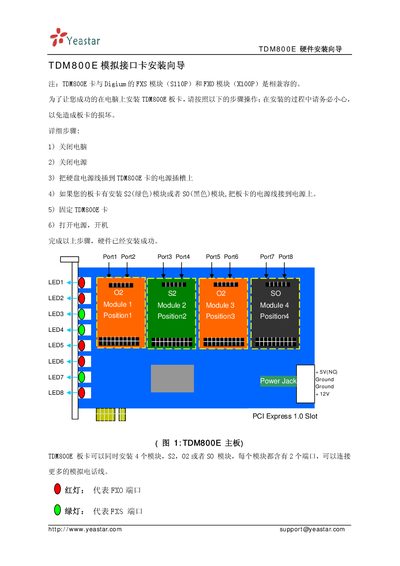
This guide provides step‑by‑step instructions for installing the Yeastar TDM800E analog interface card. It details the hardware mounting process, required precautions, and how to connect the board to power and other equipment.
The TDM800E supports up to four Digium FXS/FXO modules, each with two ports, and includes RJ11 pin assignments (pins 3 and 4). Warranty terms and support contact information are also included. This manual is written in Japanese.
| RJ11 pins used | Pins 3 and 4 |
|---|
It uses pins 3 and 4 of the RJ11 connector.