
Key facts
- Manuals
- 2
- Languages
- ZH · JA
- Last added
- 2026-09-29
Featured Yeastar manuals

Yeastar S1000 IPPBX Administrator Manual
This administrator manual is intended for system administrators who need to configure and maintain the Yeastar S1000 IPPBX. It covers all functional modules, including system settings, user permissions, extension management, trunk configuration, call control, IVR, and more.
The document includes detailed procedures for initial setup, network configuration, backup and restore, firmware upgrade, troubleshooting, and activation of additional extensions. It also provides reference tables for hardware interfaces and default login credentials. This manual is written in Chinese.
Covers: Product Introduction · System Settings · Network Configuration · User Permissions · Extension Management · Trunk Configuration
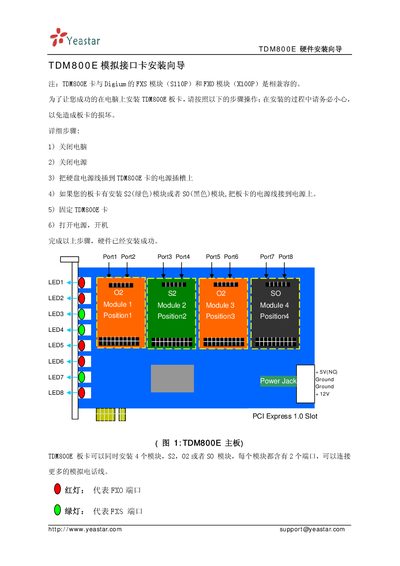
Yeastar TDM800E Installation Guide
This guide provides step‑by‑step instructions for installing the Yeastar TDM800E analog interface card. It details the hardware mounting process, required precautions, and how to connect the board to power and other equipment.
The TDM800E supports up to four Digium FXS/FXO modules, each with two ports, and includes RJ11 pin assignments (pins 3 and 4). Warranty terms and support contact information are also included. This manual is written in Japanese.
Covers: Hardware Installation Guide · Package Contents · Installation Steps · Port Connections · Warranty · Compatibility
Latest Yeastar manuals
Yeastar S1000 IPPBX Administrator Manual
Service Manual 94 pages · 3.5 MB · ZHThe Yeastar S1000 IPPBX Administrator Manual provides setup, configuration, and management instructions for the S1000 system.
Yeastar TDM800E Installation Guide
Installation Guide 2 pages · 144 KB · JAInstallation guide for the Yeastar TDM800E analog interface card, covering hardware setup, port connections, and warranty information.
Which document do I need?
Service Manual
Disassembly, diagnostics and part numbers, for repair.
Installation Guide
Mounting, wiring and first power-up. Read it before the hardware goes in.
Questions answered in Yeastar manuals
How do I log into the S1000 web interface?
Enter the default IP address https://192.168.5.150:8088 in a browser, then use the username admin and password password to log in.
How can I reset the S1000 to factory settings?
Open the Maintenance > Reset and Restart menu in the web interface and click the reset button to restore factory defaults.
Which RJ11 pins does the TDM800E use?
It uses pins 3 and 4 of the RJ11 connector.