
DM72 series tachometer is a tachometer produced by Trions company. It can simultaneously display speed (or speed ratio line speed, frequency, etc.), control value, and current data will not be lost after power failure. This product has normally open and closed relay output terminals, which can be used to control external devices. This product has a DC10V power supply, which can be used with the company's produced gear sensors to form a low-cost speed measuring control system.
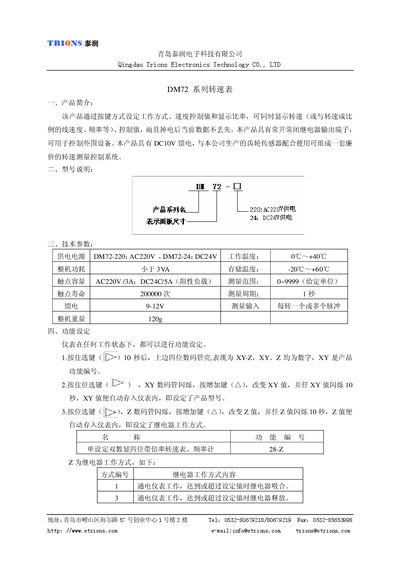
This manual describes the DM72 series turn speed table, which allows users to set work mode, speed control values and display ratios via button inputs. The device retains data after power loss and provides relay outputs for controlling external equipment.
The document covers function configuration, usage instructions, terminal wiring diagrams, sensor connections, physical dimensions, and technical specifications such as power supply options, measurement range, and contact ratings. This manual is written in Chinese.
| Power supply options | AC220V (DM72-220) / DC24V (DM72-24) |
|---|---|
| Working temperature range | 0C–HOC |
| Storage temperature range | -20C–+H60TC |
| Power consumption | < 3VA |
| Contact capacity | AC220V 73A / DC24V 5A |
| Contact life | 200 000 cycles |
| Measurement range | 0–9999 (unit selectable) |
| Measurement period | 1 second |
| Supply voltage (feed) | 9–12 V |
| Weight | 120 g |
Press and hold the select key for 10 seconds; the upper four‑digit display will flash, then use the increase key to change the XY value, which flashes for 10 seconds and is stored automatically.
Press the position select key, then press the increase key to change the value; the display flashes for 10 seconds and the setting is saved automatically.
The contacts can handle AC220 V up to 73 A or DC24 V up to 5 A for resistive loads.