
Key facts
- Manuals
- 2
- Languages
- ZH
- Last added
- 2011-10-01
Featured TRIONS manuals
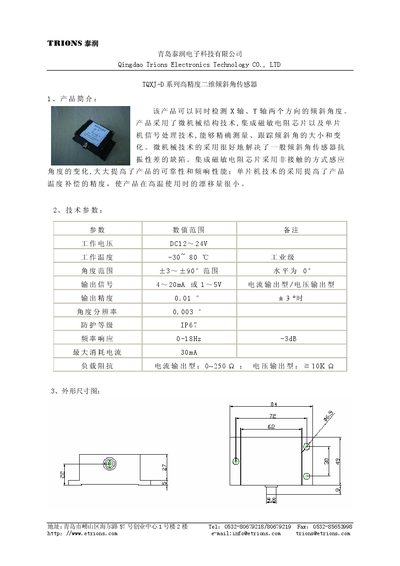
TRIONS TQXJ-D Series 2D Tilt Angle Sensor Manual
The TQXJ-D series is a high‑precision two‑dimensional tilt angle sensor that measures X‑ and Y‑axis inclination using micro‑mechanical structure, an integrated magnetoresistive chip and MCU signal processing. It offers high accuracy, vibration resistance, and temperature‑compensated performance.
The manual includes a product overview, technical specifications, mechanical drawing, signal‑position relationship, model description, and detailed installation and wiring instructions, including connector pinout and horizontal mounting procedure. This manual is written in Chinese.
Covers: Product Overview · Technical Specifications · Mechanical Drawing · Signal and Position Relationship · Model Description · Installation and Use
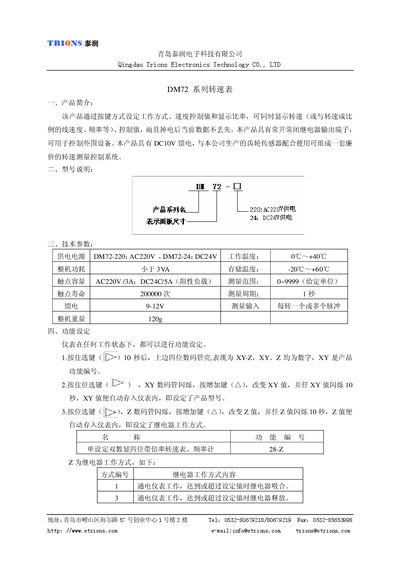
Trions DM72 Turn Speed Table Manual
This manual describes the DM72 series turn speed table, which allows users to set work mode, speed control values and display ratios via button inputs. The device retains data after power loss and provides relay outputs for controlling external equipment.
The document covers function configuration, usage instructions, terminal wiring diagrams, sensor connections, physical dimensions, and technical specifications such as power supply options, measurement range, and contact ratings. This manual is written in Chinese.
Covers: Product Overview · Model Description · Function Settings · Usage Instructions · Terminal Wiring Diagram · Sensor Wiring
Latest TRIONS manuals
TRIONS TQXJ-D Series 2D Tilt Angle Sensor Manual
User Manual 2 pages · 159 KB · ZHThe TRIONS TQXJ-D series sensor manual provides an overview, specifications, wiring and installation instructions for the high‑precision 2‑axis tilt angle…
Trions DM72 Turn Speed Table Manual
User Manual 3 pages · 217 KB · ZHThe Trions DM72 turn speed table manual explains operation, function settings, wiring and specifications for the DM72 series speedometer.
Which document do I need?
User Manual
Day-to-day operation, settings and troubleshooting. Start here if the product is already set up.
Questions answered in TRIONS manuals
How should the sensor be wired?
Connect terminal 1 (red) to the positive power supply, terminal 2 (black) to ground, terminal 3 (yellow) to the X‑axis output signal, and terminal 4 (blue) to the Y‑axis output signal.
How is the sensor installed horizontally?
Fix the sensor with screws to the measured plane, ensure the rotation axis is perpendicular to the sensor base, and adjust the plane until the output signal is at the mid‑range (12 mA for current output or 3 V for voltage output).
How do I set the product function number on the DM72?
Press and hold the select key for 10 seconds; the upper four‑digit display will flash, then use the increase key to change the XY value, which flashes for 10 seconds and is stored automatically.
How can I configure the relay operation mode?
Press the position select key, then press the increase key to change the value; the display flashes for 10 seconds and the setting is saved automatically.