
This document introduces the basic audio and video connections of Philips DVP3986K DVD player, as well as how to set the on-screen display language, start playing the disc, etc.
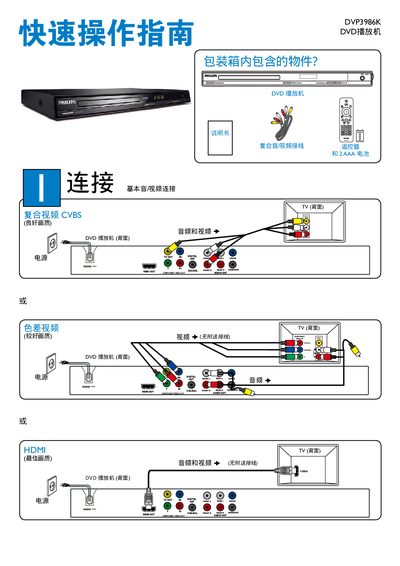
This manual describes how to connect the DVP3986K DVD player to a TV or audio system using HDMI, component video, audio, digital coaxial, and CVBS inputs and outputs. It also explains power requirements, including the use of two AAA batteries, and how to switch the unit on, off, and into standby mode.
The Setup menu lets you select the screen language (English or Chinese), enable sleep timer, adjust volume, and configure DivX(R) video settings. Additional sections cover standby operation, battery replacement, and troubleshooting tips for common issues. This manual is written in Chinese.
| Audio output | Audio out, Digital out coaxial |
|---|---|
| HDMI support | HDMI IN and HDMI OUT |
| Standby control | STANDBY‑ON button |
Press the STANDBY‑ON button on the remote or unit.
Open the SETUP menu and select the desired language (ENGLISH or CHI).