
This document is a 430 simplified Chinese instruction manual, which introduces the functions of powering on and off, switching to English display, checking phone number and email address, making and receiving calls, saving and viewing phonebook entries, using the camera to capture animations and snapshots, making international long-distance calls, and other mobile phone features.
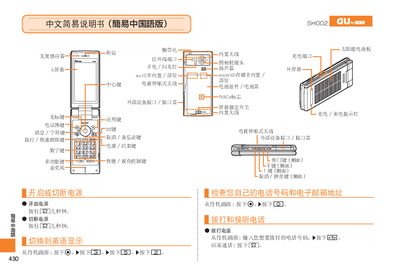
This manual describes the basic operation of the Sharp SH002 phone. It covers powering on and off, dialing numbers, answering incoming calls, and using the built‑in microphone and speaker. It also explains how to manage contacts, set silent mode, and use voice memos.
Additional sections detail the phone’s camera functions, including taking photos, recording animations, and switching between photo and animation modes. The guide also mentions the solar panel, microSD card slot, built‑in antenna, and Felica support, as well as customer service contact information. This manual is written in Chinese.
| Solar panel | Built‑in |
|---|---|
| microSD storage | Built‑in slot |
| Felica | Supported |
| Battery | Removable |
Press and hold the power button for a few seconds.
When the ringtone sounds, press the answer button.
Press the camera button (marked with a green icon) to start shooting.
Press and hold the mute button for more than one second.