
KX-MB238CN is a stable performance multifunction printer that combines color scanning, copying, and laser printing. It features high-resolution printing and copying, fast printing speed, a paper tray with a large capacity, and a user-friendly interface.
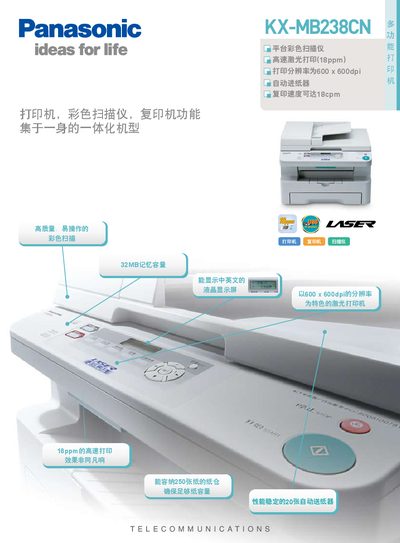
The Panasonic KX-MB238CN is a multifunction office device that combines laser printing, color scanning, and copying in a single tabletop unit. It offers high‑speed 18 ppm printing, 600 × 600 dpi resolution, a 250‑sheet paper tray, and a 20‑sheet automatic feeder.
This manual details the product’s specifications, explains how to install and connect the printer via USB 2.0, and provides step‑by‑step instructions for printing, scanning, and copying. It also lists power consumption, dimensions, and maintenance information. This manual is written in Chinese.
| Print speed | 18 PPM |
|---|---|
| Print resolution | 600 × 600 dpi |
| Scan resolution (ADF) | 600 × 300 dpi |
| Maximum interpolated scan resolution | 9600 × 9600 dpi |
| Copy speed | 18 CPM |
| Memory capacity | 32 MB |
| Paper capacity | 250 sheets |
| Automatic feeder capacity | 20 sheets |
| USB interface | USB 2.0 |
| Power consumption (sleep) | ≈5.5 W |
| Maximum power consumption | ≈900 W |
| Dimensions (W × D × H) | 420 × 445 × 305 mm |
| Weight | ≈13 kg |
The printer can print at a speed of 18 pages per minute.
The automatic feeder can hold up to 20 sheets.