
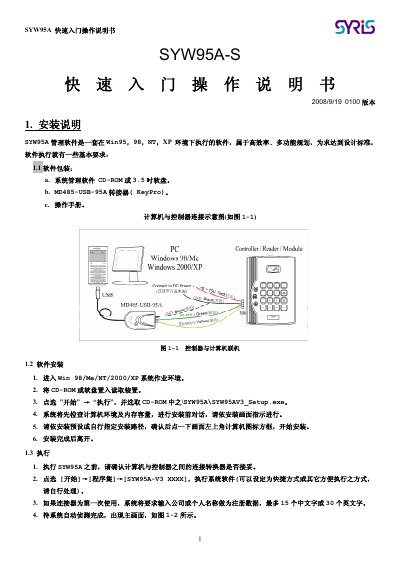
The guide provides step‑by‑step instructions for installing the SYW95A management software on Windows platforms, connecting the MD485‑USB‑95A adapter, and launching the application. It also explains how to set up controller data, configure modules, and define door zones and card readers.
Additional sections cover adding and managing card data, department information, card issuance procedures, and transferring updated data to the controller. The document includes screenshots of the main interface and detailed parameter limits for modules, doors, and card handling. This manual is written in Chinese.
| Maximum modules per controller | 20 |
|---|---|
| Maximum modules of the same type | 8 |
| Module code range | 1‑8 |
| Maximum door zones per controller | 4 |
| Maximum card readers per door zone | 2 |
| Maximum card readers total | 8 |
| Anti‑PassBack levels | 3 |
| Open‑door output module code range | 0‑8 |
| Open‑door output channel range | 1‑4 |
| Open‑door action time range (seconds) | 1‑999 |
A controller can connect up to 20 modules in total, with no more than 8 modules of the same type.
The door‑open action time can be programmed between 1 and 999 seconds.