
Key facts
- Manuals
- 10
- Models
- 3
- Categories
- 1
- Languages
- ZH · EN
- Last added
- 2026-09-29
Syris models by category
Featured Syris manuals
SYRIS SYCAPS-TAM Attendance Management System User Manual
The SYCAPS‑TAM attendance management system from SYRIS Technology Corp. is a software solution for tracking employee attendance, managing shifts, overtime, and leave. This manual guides users through installing the software, importing card data, and configuring attendance parameters.
Key sections cover software installation, card‑data import from SYW95A or SYBASE databases, shift‑time configuration (including preset 08:00‑17:00 shift and customizable two‑period shifts), monthly scheduling, overtime and leave management, and various attendance data reports. This manual is written in Chinese.
Covers: Installation · Card Data Import · Shift Settings · Monthly Scheduling · Overtime Management · Leave Management
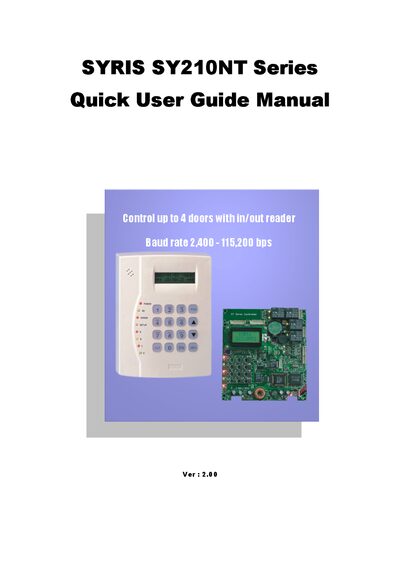
SYRIS SY210NT Series Serial Controller Quick User Guide
The SYRIS SY210NT Series serial controller manages up to four doors with in/out readers and supports baud rates from 2,400 to 115,200 bps. It provides functions such as login/logout, module setup, card and fingerprint handling, and controller ID configuration.
The manual walks the user through initial installation, login steps, setting up reader IDs, adding or editing cards, configuring controller IDs for multiple units, and defining procedure controls like opening doors via button presses. Each section includes menu navigation details and screen prompts to help users operate the controller efficiently.
Covers: Attention matter · Login/logout steps · Setup module (setup reader) · Add/delete/edit card · Add and delete fingerprint · Setup controller ID (when multiple controllers online)
SYRIS SYW95A-V3 Access Management System Advanced Manual
This advanced manual provides a comprehensive guide to the SYW95A-V3 access management system, covering flow‑control concepts, event detection, and action response. It explains the system’s flexibility, listing the 26 detectable events and 11 possible actions for the SY210NT series controllers.
The document walks users through configuring flow control, setting up control and alarm groups, and defining card permissions (master, engineer, operator). It includes tables of event‑action mappings, default flow‑control settings, and step‑by‑step instructions for editing controller data and programming card codes. This manual is written in Chinese.
Covers: Flow Control Overview · Flow Control Planning · Control Group Settings · Alarm Group Settings · Card Settings · Default Flow Control Table
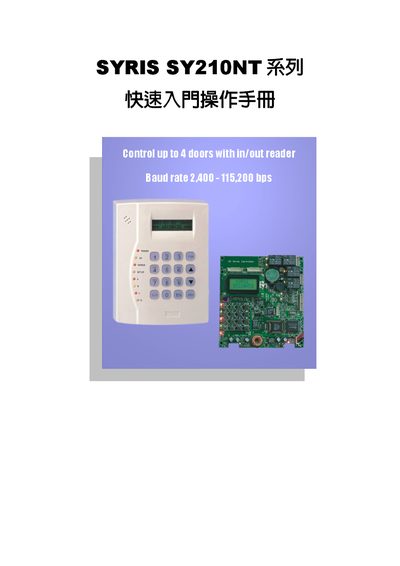
SYRIS SY210NT Controller Quick Start Guide
This guide helps users become familiar with the basic operation of the SYRIS SY210NT series controller. It covers initial login, logout, and the menu structure needed to access all functions.
The document also details module (reader) configuration, adding, editing, and deleting cards and fingerprints, setting a unique controller ID for multi‑controller installations, and programming flow control such as door‑opening button settings. This manual is written in Chinese.
Covers: Precautions · Login and Logout Steps · Module Settings (Reader Settings) · Card Add/Delete/Edit · Fingerprint Add/Delete · Controller ID Settings
Latest Syris manuals
SYRIS SYCAPS-TAM Attendance Management System User Manual
User Manual 3 pages · 134 KB · ZHThe SYRIS SYCAPS-TAM attendance management system user manual provides installation steps, card‑data import, and attendance‑setting procedures.
SYRIS SY210NT Series Serial Controller Quick User Guide
Quick Start Guide 21 pages · 945 KB · ENA quick guide for the SYRIS SY210NT Series serial controller covering installation, login, reader setup, card management, and door control procedures.
SYRIS SYW95A-V3 Access Management System Advanced Manual
User Manual 52 pages · 981 KB · ZHThe SYRIS SYW95A-V3 Access Management System Advanced Manual details flow control events, actions, and configuration procedures.
SYRIS SY210NT Controller Quick Start Guide
Quick Start Guide 22 pages · 1019 KB · ZHThe SYRIS SY210NT controller quick start guide explains login, module setup, card and fingerprint management, controller ID configuration, and flow control.
SYW95A-S Quick Start Guide
Quick Start Guide 6 pages · ZHQuick Start Guide for installing the software, connecting the controller, and configuring modules and card readers for the SYW95A-S system.
SYRIS SY210NT2 operating Manual
SYRIS SY120SA operating Manual
SYRIS SY210NT Series Controller Operation Manual
User Manual 47 pages · 580 KB · ZHThe SYRIS SY210NT controller manual provides product overview, wiring, RS‑485 connections, initial setup, and operation instructions.
SYRIS SY260NT-V3A Controller User Manual
User Manual 9 pages · 171 KB · ZHThe SYRIS SY260NT-V3A controller user manual explains installation, login, time/date setup, card reader configuration, and door lock wiring.
SYRIS SY210NT Controller Quick Start Guide
Quick Start Guide 22 pages · 996 KB · ZHThis quick start guide explains setup, login, module configuration, card management, and flow control for the SYRIS SY210NT controller.
Which document do I need?
User Manual
Day-to-day operation, settings and troubleshooting. Start here if the product is already set up.
Quick Start Guide
The shortest path to a working setup, usually only a few pages.
Questions answered in Syris manuals
How many doors can the SY210NT controller control?
It can control up to four doors with in/out readers.
From: SYRIS SY210NT Series Serial Controller Quick User Guide
How do I log in to the SY210NT controller?
Press the Enter key, then enter the password 1+2+3+4+EN and press EN to log in.
From: SYRIS SY210NT Series Serial Controller Quick User Guide
How many modules can be connected to a SYW95A‑S controller?
A controller can connect up to 20 modules in total, with no more than 8 modules of the same type.
How long can the door‑open action be programmed?
The door‑open action time can be programmed between 1 and 999 seconds.
How many controllers can be connected to one management computer?
A single management computer can connect up to 99 controllers in a parallel (bus) configuration.
What is the default password for the initial login?
The default password for the first login is 1234.