
Dell Precision Rack 7910 Quick Start Guide introduces the features and characteristics of the product.
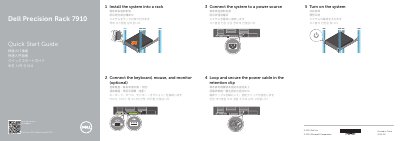
This quick start guide for the Dell Precision Rack 7910 walks through the initial setup in five illustrated steps: installing the system into a rack, connecting the keyboard, mouse, and optional monitor, connecting the system to a power source, looping and securing the power cable in the retention clip, and turning on the system.
The second part of the guide lists the system features with numbered callouts, including the power button and power light, NMI button, system identification button, VGA connector, LCD menu buttons and LCD panel, hard-drive bays, vFlash media card slot, USB 2.0 and USB 3.0 connectors, USB management port/iDRAC Direct, optional optical drive, iDRAC8 Enterprise port, half-height and full-height PCIe expansion card slots, serial connector, network connectors, and power supply. Support, contact, and regulatory links are also provided.
| Computer model | Dell Precision Rack 7910 |
|---|---|
| Regulatory type | E31S001 |
| USB connectors | USB 2.0 connector and USB 3.0 connectors |
| PCIe expansion card slots | Half-height and full-height slots |
| Network connectors | Network connectors |
| iDRAC port | iDRAC8 Enterprise port (optional) |
The guide's first step is to install the system into a rack, followed by connecting the keyboard, mouse, optional monitor, and a power source.
Loop the power cable and secure it in the retention clip.
Dell lists dell.com/support and dell.com/support/manuals for product support and manuals.