
User manual for Dell™ laptop.
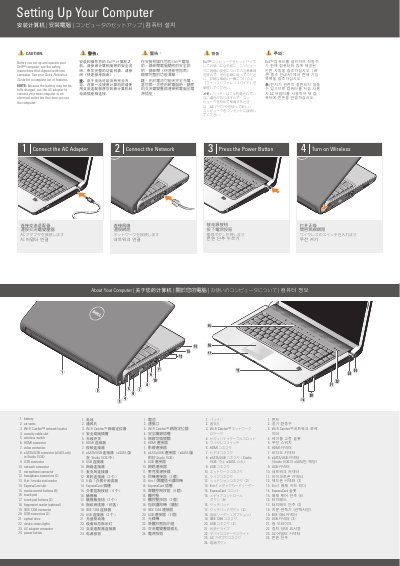
This is the "Setting Up Your Computer" quick start guide for a Dell laptop, printed in March 2008. It walks new users through the first steps: connecting the AC adapter (recommended on first use because the battery may not be fully charged), connecting the network, pressing the power button, and turning on wireless.
A numbered diagram identifies the computer's features, including the Wi-Fi Catcher network locator, HDMI and eSATA/USB connectors, 8-in-1 media card reader, ExpressCard slot, fingerprint reader (optional), and IEEE 1394 connector. The guide also shows an optional wireless network layout (Internet service, cable or DSL modem, wireless router, and computers) and refers users to the Quick Reference Guide or support.dell.com for more information. The document is multilingual, with the same content repeated in several languages.
| Media card reader | 8-in-1 media card reader |
|---|---|
| Expansion slot | ExpressCard slot |
| Fingerprint reader | Optional |
| eSATA/USB connector | eSATA only in Studio 1536 |
| Media control buttons | 9 |
| Headphone connectors | 2 |
| IEEE 1394 connector | Included |
Yes. Because the battery may not be fully charged, Dell instructs you to use the AC adapter to connect the new computer to an electrical outlet the first time you use it.
No, eSATA is only available in the Studio 1536.
See the Quick Reference Guide; if you do not have a printed copy, go to support.dell.com.
The guide shows an Internet service connection, a cable or DSL modem, a wireless router, and a portable computer with a wireless network card (a desktop with network adapter is optional).