
Manual of Dell computer.
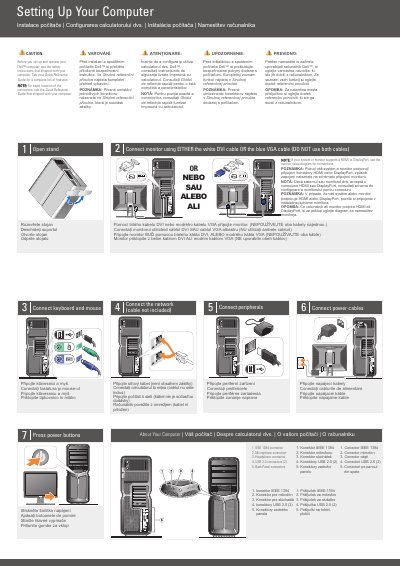
The Dell XPS 730/730X setup document shows the initial connection steps for a desktop computer: connecting the keyboard and mouse, attaching the monitor with a DVI or VGA cable, connecting the network and peripherals, attaching power cables, and pressing the power buttons. It also identifies back-panel connectors including IEEE 1394, microphone, headphone, and two USB 2.0 ports.
A separate optional wireless network section shows a cable or DSL modem, a wireless router, and desktop computers with network or USB wireless adapters. The document refers readers to the Quick Reference Guide or support.dell.com for more information.
| IEEE 1394 connector | 1 |
|---|---|
| Microphone connector | 1 |
| Headphone connector | 1 |
| USB 2.0 connectors | 2 |
| Back panel connectors | Included |
| Monitor connection | White DVI cable or blue VGA cable; do not use both |
Connect the monitor with either the white DVI cable or the blue VGA cable; do not use both cables.
See the safety instructions that shipped with the computer.
See the Quick Reference Guide, or go to support.dell.com if you do not have a printed copy.
It shows Internet service, a cable or DSL modem, a wireless router, and desktop computers with network or USB wireless adapters.