
Quick Start Guide for Dell OptiPlex 7050 Micro Desktop
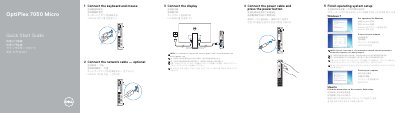
This guide covers the initial setup of the Dell OptiPlex 7050 Micro desktop. It describes connecting the keyboard and mouse, optionally connecting the network cable, connecting the display, connecting the power cable, and pressing the power button.
The guide also covers finishing operating system setup for Windows 7 and Ubuntu, including setting a Windows password, connecting to a network, and protecting the computer. A features section lists the front and rear ports and indicators, along with regulatory model information and support resources.
| Regulatory model | D10U |
|---|---|
| Regulatory type | D10U002 |
| Computer model | OptiPlex 7050 Micro |
| Rated voltage | 100 - 240 volts |
| Rated frequency | 50 - 60 Hz |
| Rated input current | 4 amperes |
| USB port type | USB 3.0 Type-C port |
| Display connectors | DisplayPort, HDMI, VGA or Serial or PS/2 — optional |
| Security slot | Kensington security cable slot |
| Printed | China, 2016-11 |
Connect the display to the discrete graphics card.
Enter the password for wireless network access when prompted.
Follow the instructions on the screen to finish setup.
Support and manuals are available at Dell.com/support and Dell.com/support/manuals.