
Dell Vostro 3660/3669 Quick Start Guide

The Dell Vostro 3660/3669 Quick Start Guide describes how to connect the keyboard and mouse, connect the network cable (optional), connect the display, connect the power cable and press the power button, and finish operating system setup.
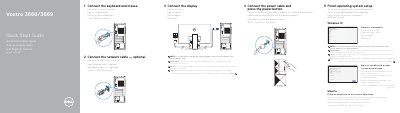

Dell Vostro 3660/3669 Quick Start Guide - cover page
Brand
DELL
Category
Desktops
Document type
Quick Start Guide
Language
English
Pages
2
File format
PDF
File size
389 KB
Published
24 November, 2023
Updated
24 November, 2023
MD5 checksum
EB8B142C8D13A9D33EC259B39DE98C31

About this manual

This guide shows the basic setup steps for the Dell Vostro 3660/3669, including connecting the keyboard, mouse, network cable, display, and power cable, then completing operating system setup.

It also identifies the computer's external features and provides links to Dell support, manuals, and regulatory information.

What's inside

  • Connect keyboard and mouse
  • Connect network cable
  • Connect display
  • Connect power cable
  • Finish operating system setup
  • Connect to network
  • Locate Dell apps in Windows 10
  • Check and update computer
  • Features
  • Product support and manuals

Frequently asked questions

What should I do if my computer has a discrete graphics card?

Connect the display to the discrete graphics card.

How do I finish operating system setup?

Follow the instructions on the screen.

Where can I find Dell apps in Windows 10?

Locate Dell apps in Windows 10.

Where can I get product support and manuals?

Use Dell.com/support.

Download PDF (389 KB)

More DELL Manuals


View all DELL manuals →