
The Dell™ Dimension™ E520 User's Guide provides information on how to set up and use the computer. It also provides information on how to connect a printer.
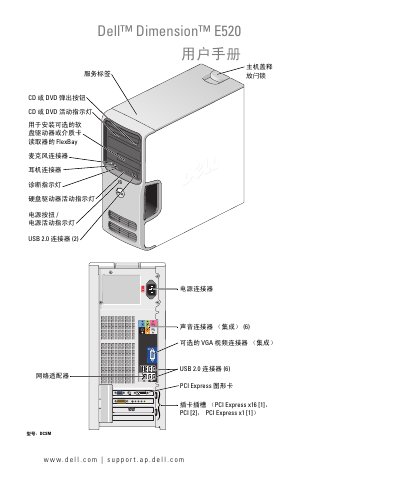
This user manual covers the installation and use of the Dell Dimension E520 desktop computer. It includes instructions for connecting peripherals such as printers, monitors, and network adapters, as well as operating the CD/DVD drive and managing power settings. The guide also explains how to adjust display settings and manage media cards. This manual is written in Chinese.
| Processor | Intel Pentium 4 with Hyper-Threading |
|---|---|
| Memory Type | DDR2 Unbuffered SDRAM |
| Maximum Memory | 4 GB |
| Network Interface | 10/100 Integrated |
| Power Supply | 305 W |
| Height | 41.4 cm (16.3 inches) |
The minimum memory required is 256 MB.
You can clear forgotten passwords using the System Setup Utility.