
Dell Dimension 4600 Computer Setup Guide

The user manual for the Dell Dimension 4600 computer.
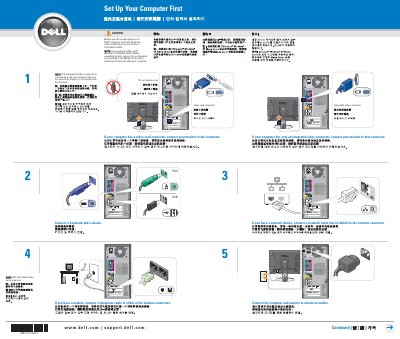

Dell Dimension 4600 Computer Setup Guide - cover page
Brand
DELL
Category
Desktops
Document type
User Manual
Language
English
Pages
2
File format
PDF
File size
1.9 MB
Published
20 November, 2023
Updated
20 November, 2023
MD5 checksum
D37445CCB0161F1FF90CFC8188EA81D7

About this manual

This document outlines the initial setup procedures for the Dell Dimension 4600 computer. It details how to connect the monitor to the appropriate video connector, whether integrated or via a video card, and how to attach network cables and power sources. Users are advised to consult the Product Information Guide for safety instructions before beginning the setup process.

What's inside

  • Set Up Your Computer
  • Connect a keyboard and a mouse
  • Set Up Other Devices Last
  • Turn on the computer and monitor
  • Connect other devices

Frequently asked questions

Where should the monitor be connected on the computer?

Connect the monitor to the video card connector if the computer has one, or to the integrated video connector if it does not.

What should be done if the integrated video connector is covered by a cap?

Do not remove the cap to connect the monitor, or the monitor will not function.

How should speakers be connected if the integrated sound connectors are covered?

Connect the speakers to the optional sound-card connectors without removing the cap covering the integrated connectors.

Download PDF (1.9 MB)

More DELL Manuals


View all DELL manuals →