
Dell N5850cc0 Computer Setup Instructions

The manual describes how to set up and operate a Dell computer.
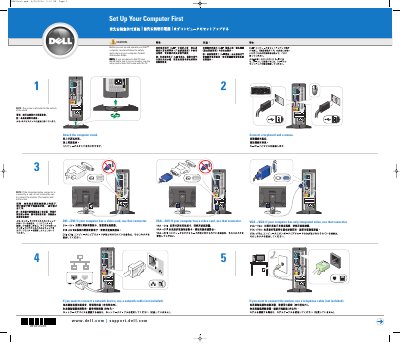

Dell N5850cc0 Computer Setup Instructions - cover page
Brand
DELL
Category
Desktops
Document type
User Manual
Language
English
Pages
2
File format
PDF
File size
2.6 MB
Published
20 November, 2023
Updated
20 November, 2023
MD5 checksum
8F31E623E65BDD71804394A936ECCA3E

About this manual

This document provides initial setup instructions for the Dell N5850cc0 computer. It covers connecting the computer stand, attaching a keyboard and mouse, and connecting the monitor using the appropriate video connector (DVI or VGA) based on the computer's video capabilities. Users are advised to read the safety instructions in the Product Information Guide before operating the device.

What's inside

  • Connect a keyboard and a mouse
  • Connect the computer and monitor to electrical outlets
  • Connect other devices
  • Access CD or DVD drive
  • Access Flash Card Reader
  • Access IEEE 1394 connector
  • Access Front USB 2.0 connectors
  • Access Headphone connector
Download PDF (2.6 MB)

More DELL Manuals


View all DELL manuals →