
Dell Color Laser Printer 3010cn User's Guide

The Dell™ Color Laser Printer 3010cn User's Guide provides detailed information on the printer's features, options, and operation.

Dell Color Laser Printer 3010cn User's Guide - cover page
Brand
DELL
Category
Printer
Document type
User Manual
Language
French
Pages
170
File format
PDF
File size
1.8 MB
Published
20 November, 2023
Updated
20 November, 2023
Model
3010cn
MD5 checksum
7BAB9C587335AE9830739E676EBB947B

About this manual

This document is the French user guide for the Dell Color Laser Printer 3010cn. It explains where to find information, how to use Dell Printer Configuration Web Tool, and how to set up a browser for that tool.

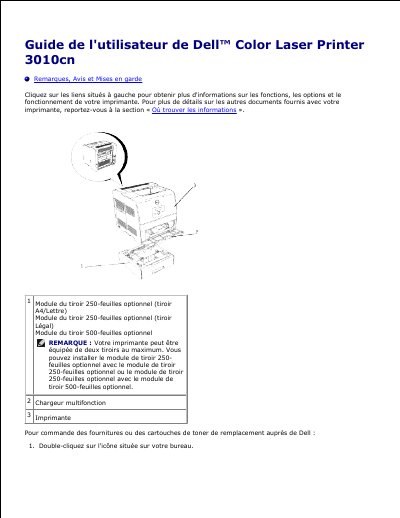
It also describes optional paper trays, states that the printer can be equipped with up to two trays, and points readers to Dell support and supplies ordering. This manual is written in French.

What's inside

  • Remarques, Avis et Mises en garde
  • Où trouver les informations
  • Dell Printer Configuration Web Tool
  • Utilisation de Dell Printer Configuration Web Tool
  • Paramètres de l'environnement du navigateur Web
  • Définition de la langue d'affichage
  • Réglage de l'adresse IP de l'imprimante sur un paramètre autre que serveur mandataire
  • Pour Netscape Communicator 7.1
  • Pour Internet Explorer 6.0

Specifications

Optional 250-sheet tray (A4/Letter)Available
Optional 250-sheet tray (Legal)Available
Optional 500-sheet trayAvailable
Maximum number of trays2

Frequently asked questions

Where is the quick service code and service ID located?

They are on the inside of the front cover of the printer.

How do I launch Dell Printer Configuration Web Tool?

Enter the printer's IP address in the web browser.

What is the default IP address?

The default IP address is 0.0.0.0.

Where can supplies be ordered?

Supplies can be ordered at www.dell.com/supplies.

Download PDF (1.8 MB)

More DELL Manuals


View all DELL manuals →