
Dell Dimension Computer Setup Guide

The document describes the steps to set up a Dell computer, including connecting the monitor, keyboard, mouse, power cord, etc.
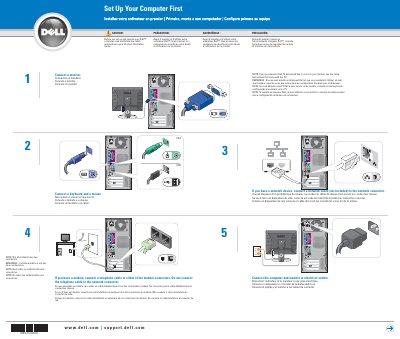

Dell Dimension Computer Setup Guide - cover page
Brand
DELL
Category
Desktops
Document type
User Manual
Language
English
Pages
2
File format
PDF
File size
452 KB
Published
20 November, 2023
Updated
20 November, 2023
MD5 checksum
147BAB06DCE5A163AFDA5551CF75C065

About this manual

This document provides initial setup instructions for Dell computers, including connecting a monitor, keyboard, mouse, and power supply. It includes multilingual text (English, French, Portuguese, and Spanish) and safety warnings advising users to read the Product Information Guide before operation.

What's inside

  • Connect a monitor
  • Connect a keyboard and a mouse
  • Connect the computer and monitor to electrical outlets
  • Connect a telephone cable to the modem
  • Connect a network cable
  • Connect other devices
  • Turn on the computer and monitor
Download PDF (452 KB)

More DELL Manuals


View all DELL manuals →