
The Dell™ Dimension™ 5150/E510 User's Manual provides information about the computer and its components.
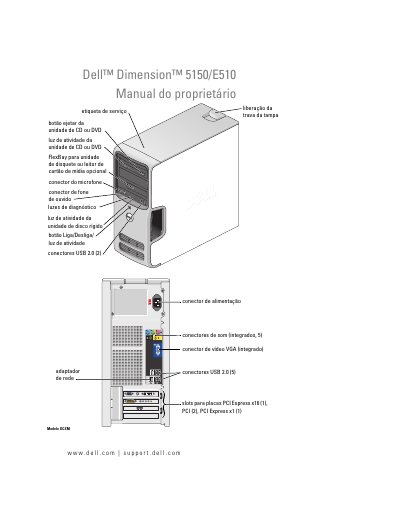
This document serves as the user manual for the Dell Dimension 5150/E510 desktop computer. It provides instructions on how to configure the computer, connect peripherals such as printers and monitors, and manage power settings. The guide also includes safety information and notes regarding the use of Microsoft Windows operating systems. This manual is written in Portuguese.
| Slots for PCI Express x16 | 1 |
|---|---|
| Slots for PCI Express x1 | 1 |
| USB 2.0 connectors (front) | 2 |
| USB 2.0 connectors (rear) | 5 |
You can find the support website at support.dell.com.
The Service Tag is used to identify your computer when utilizing Dell support.