
This document describes the user instructions for RAK's TCP-80, TCP-502 and UDP-1008 protocol video modules.
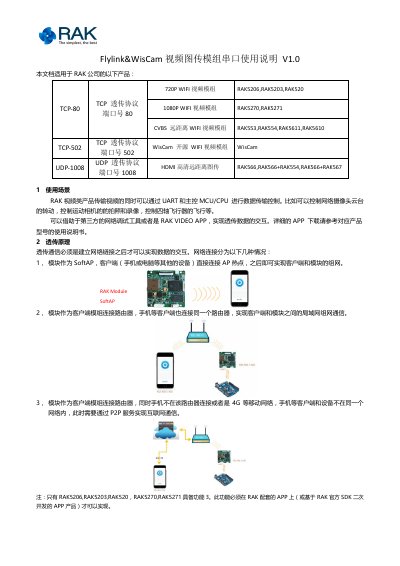
This document from RAK explains how to use the UART serial port of its Flylink&WisCam video transmission modules, including the 720P WIFI modules RAK5206/RAK5203/RAK520, the 1080P WIFI modules RAK5270/RAK5271, the CVBS long-range WIFI modules RAK553/RAK554/RAK5611/RAK5610, the WisCam open-source WIFI module, and the HDMI long-range transmission modules RAK566, RAK566+RAK554 and RAK566+RAK567.
While video is transmitted, data can be exchanged with a host MCU/CPU over UART, for example to control a network camera pan-tilt, a sports camera, or a quadcopter. The manual describes three networking cases (module as SoftAP, module and client on the same router, and P2P communication over the internet) and three transparent transmission modes: TCP-80 and UDP-1008, which add or filter the protocol header 01 55, and TCP-502, which is pure transparent transmission without any protocol header. It also explains how to read and change the serial baud rate via browser commands. This manual is written in Chinese.
| Default serial parameters | 115200-8-1-n |
|---|---|
| Selectable baud rates | 9600, 19200, 57600, 115200 |
| TCP-80 protocol | TCP transparent transmission, port 80 |
| TCP-502 protocol | TCP transparent transmission, port 502 |
| UDP-1008 protocol | UDP transparent transmission, port 1008 |
| Protocol header | 01 55 (hex), auto filtered/added on TCP-80 and UDP-1008 |
Only RAK5206, RAK5203, RAK520, RAK5270 and RAK5271 have this function, and it requires RAK's own APP or an APP developed with the official RAK SDK.
Connect to the module's network, get its IP address, then open a browser and enter the set_baudrate command, e.g. 192.168.100.1/server.command?command=set_baudrate&type=uart1&value=9600. Log in with username and password admin; a return value of 0 means the configuration succeeded.
Use the get_baudrate command in a browser, for example 192.168.100.1/server.command?command=get_baudrate&type=uart1.
No, TCP-502 is pure transparent transmission without any protocol header.