
This document is the user manual of Scalarider FREECOM 4. It mainly introduces the functions and usage methods of this product.
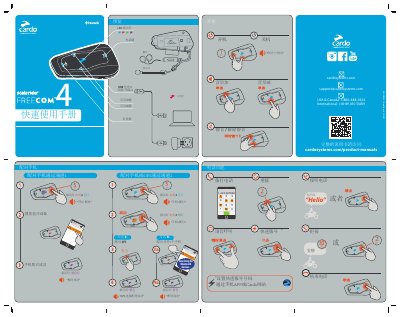
This manual provides instructions for the Cardo FREECOM 4 Bluetooth communication device, including button functions, LED indicators, USB charging, and firmware upgrade port. It details how to pair phones via two channels, pair GPS devices, set speed dial, and manage incoming calls.
The guide also explains intercom pairing between riders, starting and ending intercom conversations, using the Cardo SmartSet mobile app for configuration and remote control, and registering the product on the Cardo website for software updates and device settings. Additional sections cover music sharing between rider and passenger, resetting pairing records, and copyright information. This manual is written in Chinese.
The app allows simple configuration, remote control operation, and flexible settings for the device.
The support phone number for the USA and Canada is 1-800-488-0363.
A phone or GPS is paired through channel 2.
The Cardo Smartset mobile app is available for the product.