
This is an instruction manual for installing BYD Battery-Box Pro
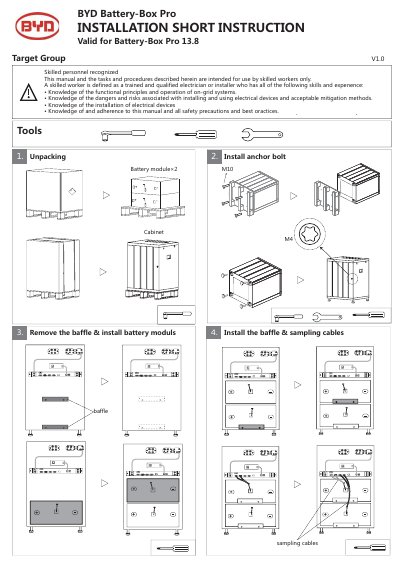
This two-page short instruction from BYD describes the installation steps for the Battery-Box Pro 13.8 lithium-ion storage system. It is addressed to skilled personnel only, defined here as a trained and qualified electrician or installer who knows on-grid system principles, the risks of installing electrical devices, and the safety precautions in this manual.
The steps cover unpacking, removing and refitting the cabinet baffle, installing the two battery modules, fitting the sampling cables and anchor bolt, connecting the power cables and CAN link to the inverter, and setting the BMS address with the DIP switch table. The document states that it is a shortened installation aid and does not replace the original Battery-Box manual, which is available from eft-systems.de or byd.com.
| Valid for model | Battery-Box Pro 13.8 |
|---|---|
| Battery modules supplied | 2 |
| Storage technology | Li-ion |
| BMS start address | 1 |
Only skilled workers, defined as a trained and qualified electrician or installer with knowledge of on-grid systems and electrical installation. The manual and the procedures in it are intended for skilled workers only.
No. It is a shortened installation aid and does not replace the original manual, which is available at www.eft-systems.de or www.byd.com.
The BMS address must start with 1 and must be consecutive; address 0 cannot be used.
Only the BMU with the last address is connected to the inverter. The document shows this as the last address in a parallel system.