
This document is the user manual of charger G630. It describes in details the usage methods, precautions and relevant parameters of the charger.
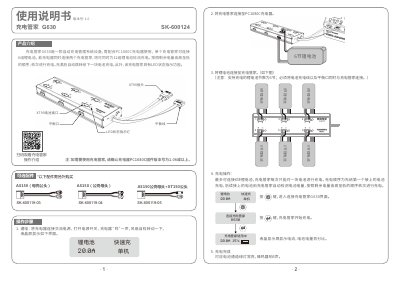
SkyRC G630 SK-600124 is an automatic charging management device used with a PC1080C charger. One unit connects up to six lithium batteries; with two units connected to the charger, up to 12 battery packs can be charged in turn. It charges the first connected battery, then checks remaining capacity and continues from highest to lowest, with LED status indication.
Operation requires the PC1080C firmware version 1.06 or later. Connect the G630 to the charger, connect each LiPo battery's charge cable and balance port, then start charging from the charger's G630 screen. The display shows current and battery percentage; a channel's green LED stays on and the buzzer sounds five times when charging is complete. The manual also lists specifications, LED states, optional accessories, safety warnings, warranty, and disclaimer. This manual is written in Chinese.
| Battery type | 6-cell lithium battery (LiPo) |
|---|---|
| Maximum current limit | 30 A |
| Connectable batteries | 6 |
| Compatible charger | PC1080C, firmware version 1.06 or above |
| Dimensions | 263 x 79 x 32 mm |
It requires a PC1080C charger with firmware version 1.06 or later.
One G630 can connect six lithium battery packs.
It first charges the first battery connected; later batteries are checked automatically and charged by remaining capacity from highest to lowest.
The corresponding channel's green LED stays on and the buzzer sounds five times.