
This manual introduces how to update the firmware of SST-900B.
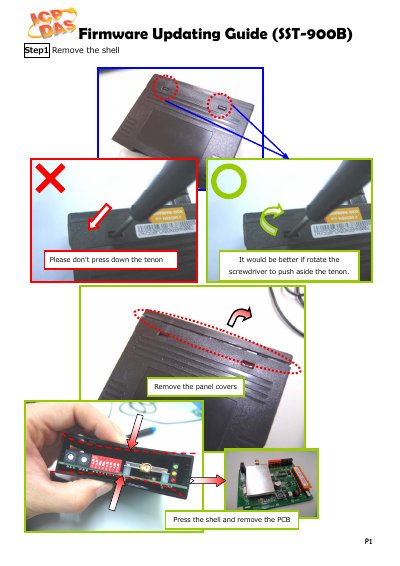
This Megawin SST-900B Firmware Updating Guide describes the steps to update firmware on the SST-900B board. It covers removing the shell and panel covers, downloading and launching ISP_ICP_Programmer.exe, connecting the Megawin downloader to a USB port, and using the programmer to load a hex file after selecting ISP, 82 Series, and MPC82G516.
After loading firmware to the downloader, the guide explains reconnecting the SST-900B board, powering it on, and pressing the button to start the update, with green and red LED indicators showing status. For verification, it describes using a serial port tool at 115200 bps and N81 via RS-232 or RS-485 interface with the 8th DIP switch set to OFF in debug mode.
| Serial port speed and format | 115200 bps, N81 |
|---|---|
| Interface | RS-232 or RS-485 |
| Downloader connection | USB port |
Download ISP_ICP_Programmer.exe from the Megawin website listed in the guide and launch it after plugging the Megawin downloader into the USB port.
The update is correct when the green LED is steady lit and the red LED is unlit after both change from blinking to steady.
Use a serial port tool at 115200 bps and N81 to connect the SST-900B via RS-232 or RS-485, turn the 8th DIP switch to OFF in debug mode, and power on the SST-900B.