
This document is the user manual for the tissot g10-212 quartz chronograph watch. It introduces the functions of the product, including timing, date, etc.
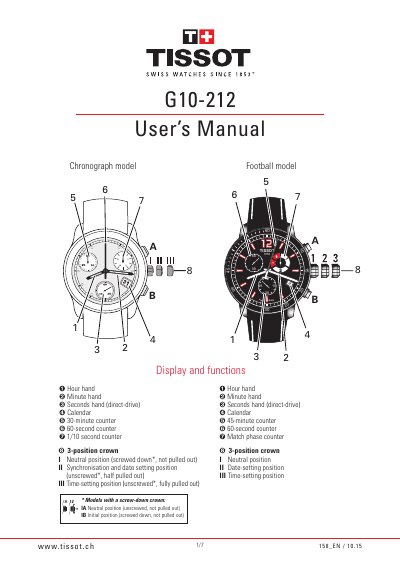
This TISSOT G10-212 user manual applies to quartz chronographs with a G10.212 movement and covers both Chronograph and Football models. It explains the display and functions, crown positions, setting the time and date, and simple timing operations.
The manual also describes the ADD and SPLIT-TIME functions, resetting the counters, timing a football match, water-resistance ratings, care and maintenance, servicing, spare parts availability, and replacing the silver oxide button cell battery.
| Movement | G10.212 quartz chronograph movement |
|---|---|
| Chronograph measurement limit | up to 30 minutes |
| Water resistance | up to 3 bar, 5 bar, 10 bar, 20 bar or 30 bar depending on case-back |
| Temperature limits | avoid over 60°C (140°F) or below 0°C (32°F) |
| Battery type | silver oxide and zinc button cell, 1.55V, no.394 |
| Power reserve | usually more than 2 years in continuous use |
Pull the crown out to position III and turn it forward or backward to set the desired time, then push it back into position I.
It uses a silver oxide and zinc button cell, 1.55V, number 394.
Yes, water resistance depends on the case-back and can be up to 3 bar, 5 bar, 10 bar, 20 bar or 30 bar.
Pull the crown out to position II, press push-button A to select the hand, press push-button B to move it to 12 o'clock, then push the crown back into position I.