
Pearl Eliminator Demon Drive Pedal User Manual

Introduces the features of the Eliminator Demon Drive pedal, including adjustable beater position, footboard angle, and spring tension, and provides three default settings for users to choose from.
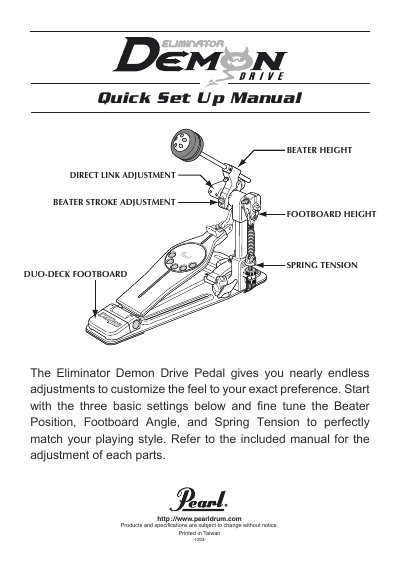

Pearl Eliminator Demon Drive Pedal User Manual - cover page
Brand
Pearl
Document type
User Manual
Language
English
Pages
4
File format
PDF
File size
489 KB
Published
27 October, 2023
Updated
27 October, 2023
MD5 checksum
9C0963A9D846869E4E2C1CBBB46B581A

About this manual

This manual explains how to adjust the Pearl Eliminator Demon Drive Pedal for different playing styles. It includes settings for high-speed accuracy, powerful tone, and light feel with power. Each setting adjusts beater stroke, footboard angle, and spring tension to match player preference. Adjustments are made via positions labeled A, B, H, and L, with specific notches for footboard height and spring tension.

What's inside

  • Beater Stroke Adjustment
  • Direct Link Adjustment
  • Footboard Angle
  • Spring Tension
  • Quick Set Up Manual

Frequently asked questions

What are the three basic settings to start adjusting the pedal?

Beater Position, Footboard Angle, and Spring Tension.

What is the factory setting for the beater stroke adjustment?

The factory setting is the FINESS "A" POSITION.

What position is the spring tension set to for players seeking Powerful Defined Tone?

One notch above standard position.

What position is the footboard for players seeking Light Feel with Power?

The footboard is set to LONG BOARD.

Download PDF (489 KB)

More Pearl Manuals


View all Pearl manuals →