
Instruction Manual
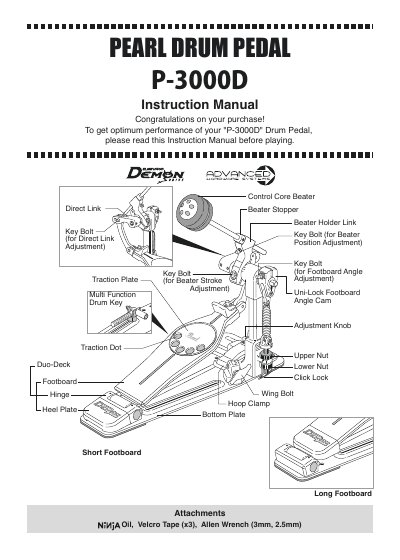
This manual provides step-by-step instructions for setting up and adjusting the Pearl P-3000D Drum Pedal. It covers beater height, stroke, and angle adjustments, footboard conversion, spring tension, and traction plate configurations. Maintenance tips include using genuine NiNjA Oil for optimal performance and checking bolt tightness before use.
Loosen the Allen Screw on the Beater Setting Stopper, then loosen the Key Bolt on the Beater Holder Link. Set the beater to the desired height and re-tighten the Key Bolt.
Loosen the Key Bolt to open the clamp and slide the Beater Holder to the Power setting position or Finesse setting position.
Loosen the Key Bolt on the Uni-Lock Footboard Angle Cam and adjust it to the desired angle, then re-tighten the Key Bolt.
Disable the Click Lock by lifting the lever upward, loosen the Upper Nut, and tighten or loosen the Lower Nut until the desired tension is achieved. Tighten the Upper Nut and press the Click Lock lever down to engage.