
Instructions on how to configure and activate the SAILOR 4300 system for KVH's Iridium Certus service.
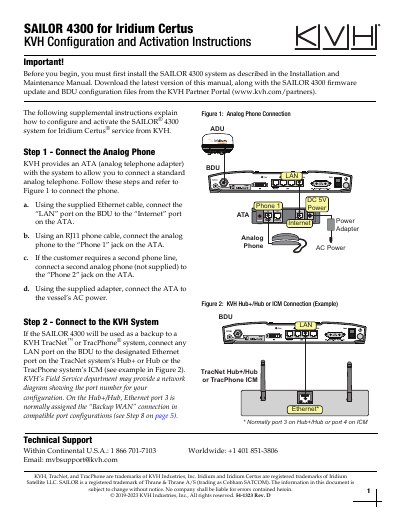
These KVH supplemental instructions explain how to configure and activate a SAILOR 4300 system for Iridium Certus service. The steps cover connecting an analog phone through the supplied ATA, installing the SIM card, updating firmware, uploading a KVH configuration file, customizing the hostname, and changing IP settings when the system is used with a TracNet H-series backup configuration.
The document also describes connecting the SAILOR 4300 BDU to a KVH TracNet or TracPhone system and configuring the TracNet port assignment. To activate Iridium Certus service, the owner submits the applicable activation form and needs the system IMEI and SIM card number.
| Default Iridium Certus network | 172.16.0.0/24 |
|---|---|
| TracNet H-series gateway IP address | 198.19.56.1 |
| Default administrator user name | admin |
| Firmware update file extension | .tiif |
Connect the LAN port on the BDU to the Internet port on the ATA with the supplied Ethernet cable, then connect the phone to the Phone 1 jack using an RJ11 cable.
Log in as an administrator; the default user name is admin, and the default password is printed on a label on the BDU.
You can find the IMEI on the Dashboard page of the service web interface or on the bottom of the ADU.
Change the gateway IP address to 198.19.56.1 and change the first three octets of the listed addresses to 198.19.56.