
This document is an installation guide, mainly introduce how to install IQ MOTION S-LINE.
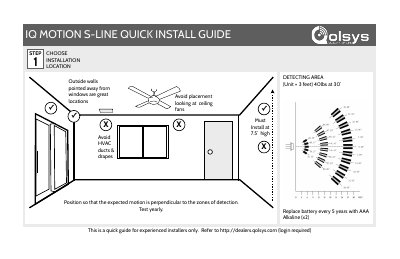
This two-page quick install guide from Qolsys covers installing the IQ Motion S-Line motion sensor. It walks installers through choosing an installation location, removing battery tabs, selecting a mounting type, securing hardware, learning the device into the panel, and opening the device casing. The guide states it is for experienced installers only and refers to http://dealers.qolsys.com (login required) for more information.
Placement guidance includes installing at 7.5 feet high, positioning so expected motion is perpendicular to the detection zones, avoiding ceiling fans, HVAC ducts and drapes, and preferring outside walls pointed away from windows. The battery should be replaced every 5 years with two AAA alkaline batteries, and the device should be tested yearly. The document lists Qolsys part number QS1231-840 and FCC ID 2AAJXQS1200.
| Detection range | 40 lbs at 30 feet (detecting area unit = 3 feet) |
|---|---|
| Recommended installation height | 7.5 feet |
| Battery | 2x AAA alkaline, replace every 5 years |
| FCC ID | 2AAJXQS1200 |
| IC | 11205A-QS1200 |
| Qolsys part number | QS1231-840 |
| Mounting | Flat corner mount at 7.5 feet high |
It must be installed at 7.5 feet high.
It uses two AAA alkaline batteries, replaced every 5 years.
Place the panel in "Auto Learn" mode, open and close the case to "tamper" the device, then customize the name and settings and touch "ADD".
Avoid placement looking at ceiling fans, and avoid HVAC ducts and drapes.