
Quick install guide
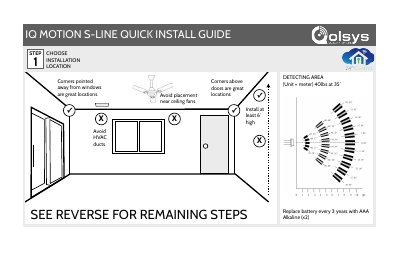
This two-page quick install guide from Qolsys describes how to set up the IQ Motion S-Line sensor. It lists six steps, from choosing an installation location through opening the casing, removing battery tabs, selecting a mounting type, securing hardware and learning the device into a panel.
Placement guidance advises installing at least 6 feet high, avoiding ceiling fans and HVAC ducts, and points to corners above doors or corners pointed away from windows as good locations. The guide also notes a 40 lbs detection rating at 35 feet, battery replacement every 3 years with two AAA alkaline batteries, and autolearn pairing instructions for the panel.
| Detection rating | 40 lbs at 35' |
|---|---|
| Recommended mounting height | At least 6 feet |
| Battery type | AAA Alkaline (x2), replace every 3 years |
| Firmware | 0B_20160826 |
| Qolsys part number | QS-1230-840 |
| Standards | ANSI/UL Std. 639; ULC Std. S306 |
Install it at least 6 feet high, avoiding ceiling fans and HVAC ducts. Corners above doors, or corners pointed away from windows, are good locations.
Replace the batteries every 3 years with two AAA alkaline batteries.
Place your panel in auto-learn mode, open and close the case to tamper the device, then customize name and settings and touch ADD.