
Quick guide to replace the battery in Qolsys IQ HUB using specified battery and safety precautions.
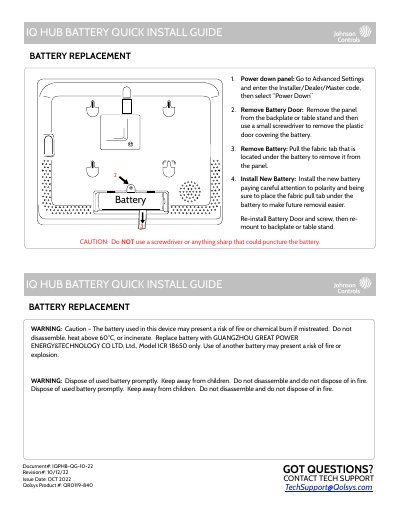
This guide explains how to safely replace the battery in the Qolsys IQ HUB. Steps include powering down the device, removing the battery door, extracting the old battery, installing a new ICR 18650 battery, and reassembling. Safety warnings emphasize not to puncture the battery or use non-specified replacements.
The guide is for technicians or users replacing the battery and includes critical safety cautions about fire and chemical hazards if the battery is mishandled or disposed of improperly.
Replace battery with GUANGZHOU GREAT POWER ENERGY&TECHNOLOGY CO LTD, Ltd., Model ICR 18650 only.
You must replace the battery with a GUANGZHOU GREAT POWER ENERGY&TECHNOLOGY CO LTD, Ltd., Model ICR 18650 only.
Do not heat the battery above 60°C.
Pull the fabric tab that is located under the battery to remove it from the panel.