
This document is the installation manual for the LD C GLINE ON TROLS Electronic Chlorine Generator, which introduces the safety precautions for using the device and the installation process, including connecting the power supply, connecting the earth wire, and connecting the common grounding grid
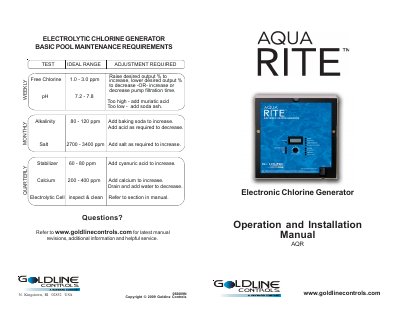
This manual provides step-by-step instructions for operating and installing the Goldline Controls Electronic Chlorine Generator. It includes guidelines for maintaining proper pool water chemistry, adjusting settings, and troubleshooting common issues. Safety precautions and warranty information are also detailed.
The document covers weekly, monthly, and quarterly maintenance tasks such as checking chlorine, pH, alkalinity, salt, stabilizer, and calcium levels. It also explains how to respond to LED warning indicators and handle potential faults like PCB issues or scaling on the cell.
Be sure that the correct model Turbo Cell has been selected (page 7). Check salt level in pool/spa. If salt level is low, add salt according to chart on page 4.
Raise desired output % to increase, lower desired output % to decrease -OR- increase or decrease pump filtration time.
Be sure that the correct model Turbo Cell has been selected (page 7). Inspect and clean cell according to directions on page 8. When done, press the "diagnostic" button for 3 seconds to stop the "Inspect Cell" LED flashing.