
Epilog Summit Model 2000/25A Laser Engraver Installation Guide

This file is an Epilog driver installation guide, which introduces how to install Epilog's printer driver on Windows 3.1 and 95 systems.
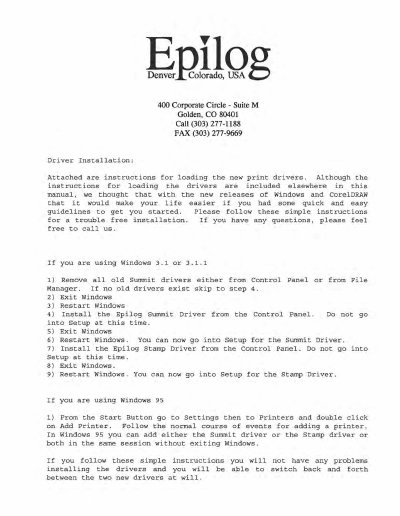

Epilog Summit Model 2000/25A Laser Engraver Installation Guide - cover page
Brand
Epilog
Document type
User Manual
Language
English
Pages
91
File format
PDF
File size
4.1 MB
Published
18 October, 2023
Updated
18 October, 2023
MD5 checksum
68B79FE08EA87739BA88EBB13C30F00C

About this manual

This manual provides detailed instructions for installing Epilog Summit and Stamp drivers on Windows 3.1 and Windows 95. It covers hardware setup, software installation, and troubleshooting. The guide also includes site requirements, computer specifications, and material suppliers for laser engraving. It is designed for users who want to operate the Epilog Summit Model 2000/25A laser engraver with standard desktop publishing systems.

What's inside

  • Unpacking Your Machine
  • Site Requirements
  • Getting Started
  • Hardware Installation & Connections
  • Software Installation
  • Engraving Machine Operation
  • Rotary Glass Attachment
  • Engraving Rubber Stamps
  • Laser Safety
  • Material Suppliers

Frequently asked questions

What is the minimum computer RAM requirement for the Epilog Summit Model 2000/25A?

The computer must have 16 MB RAM.

What voltage and amperage outlet is required for the Epilog Summit Model 2000/25A?

A single 115 Volt, 15 Amp outlet is required.

What is the weight of the Epilog Summit Model 2000/25A laser engraver?

The machine weighs about 150 pounds.

What is the minimum recommended monitor resolution for the Epilog Summit Model 2000/25A?

A 1024 x 768 Super VGA Color Monitor is recommended.

Download PDF (4.1 MB)

More Epilog Manuals


View all Epilog manuals →