
Genius Maps Installation Guide for WebLink IVI Systems

this document is the genius maps installation guide
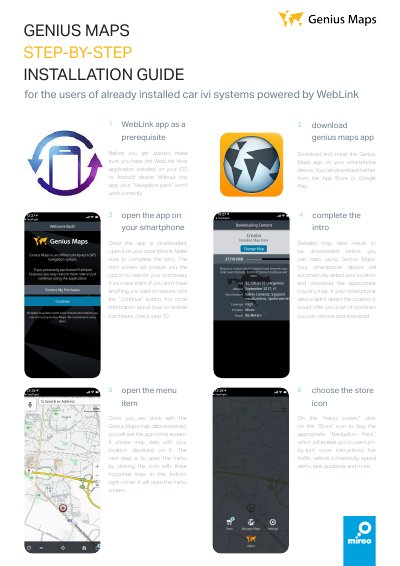

Genius Maps Installation Guide for WebLink IVI Systems - cover page
Brand
Genius
Category
Car
Document type
User Manual
Language
English
Pages
2
File format
PDF
File size
1.1 MB
Published
18 October, 2023
Updated
18 October, 2023
MD5 checksum
67741E4E022FCCCD4EC829753E0E0BA6

About this manual

This guide provides instructions for installing and configuring the Genius Maps app on smartphones to use with WebLink-powered car IVI systems. It details the prerequisite of having the WebLink Host application installed on the user's iOS or Android device.

What's inside

  • WebLink Host application
  • Genius Maps app download
  • Map data download
  • Store icon
  • Navigation Pack
  • My Purchases
  • USB connection

Frequently asked questions

What app is required before installing Genius Maps?

The WebLink Host application must be installed on your iOS or Android device.

How do you start using Genius Maps after downloading the app?

Open the app, complete the intro, and download the map data for your location.

What must you select when choosing a Navigation Pack?

You must select the “Navigation Pack” with the “for WebLink” suffix.

How do you connect your smartphone to use Genius Maps with the car IVI system?

Connect your smartphone to the car IVI system via USB cable.

Download PDF (1.1 MB)

More Genius Manuals


View all Genius manuals →